
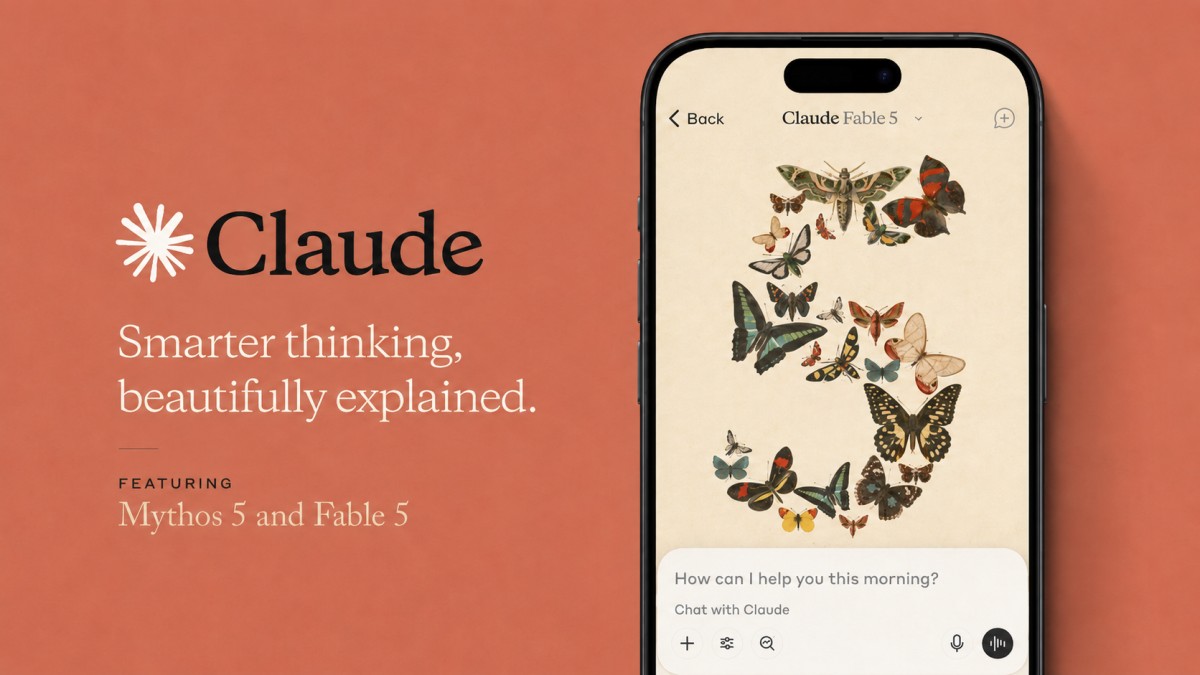
The Ultimate Claude AI Guide: Every Feature, Tip, and Prompt You Need in 2026
With over 11 million daily active users and a $380 billion valuation in 2026, Claude AI has become one of the fastest-growing AI platforms on the planet. Whether you are a complete beginner exploring AI for the first time or a professional looking to supercharge your workflow, this Claude AI guide covers everything you need to know: every feature, every pricing plan, the best Claude AI prompts, real-world use cases, and proven best practices to get the most out of Anthropic’s AI assistant.
I have been using Claude daily for content creation, coding, research, and business analysis, and the platform has evolved dramatically. From comparing the best AI models to building full-stack applications with Claude Code, I have tested nearly every Claude AI features set Anthropic offers. This Claude AI guide distills that hands-on experience into a practical, actionable resource with real Claude AI prompts you can start applying immediately — fully updated for the June 2026 launch of Claude Fable 5 and Claude Mythos 5.
Table of Contents
What Is Claude AI and Why Does It Matter in 2026?
Claude AI is a family of large language models developed by Anthropic, a company founded in 2021 by former OpenAI researchers Dario and Daniela Amodei. Named after Claude Shannon, the father of information theory, Claude is designed around a safety-first philosophy called Constitutional AI. This Claude AI guide starts with the fundamentals because understanding the philosophy behind the platform helps you use its Claude AI features more effectively.
What makes this Claude AI guide timely is the platform’s explosive growth. Claude reached 11 million daily active users in early 2026 and overtook ChatGPT in both the US App Store and Google Play. Anthropic’s annualised revenue hit $14 billion by February 2026, crossed roughly $20 billion in early March, and surpassed $30 billion by early April according to Bloomberg and VentureBeat reporting. The company raised $30 billion in Series G funding at a $380 billion valuation, is in early talks with Goldman Sachs, JPMorgan, and Morgan Stanley about a potential IPO as soon as October 2026, and 70% of Fortune 100 companies now use Claude in their workflows. Anthropic also launched the Claude Partner Network on 12 March 2026, a $100 million programme that brings Accenture, Deloitte, Cognizant, Infosys, and other major consultancies into a formalised ecosystem with a new Claude Certified Architect technical certification.
Claude stands apart from competitors through its 1 million token context window, industry-leading coding performance, nuanced writing quality, and a fast-growing ecosystem of Claude AI features like Claude Code, Cowork, Dispatch, Claude Design, and browser-based automation. Microsoft brought Claude into Microsoft 365 Copilot in March 2026, confirming Claude’s enterprise credibility. This Claude AI guide covers the releases that have reshaped the platform through mid-2026: Claude Opus 4.8 (28 May 2026), and — most significantly — the 9 June 2026 launch of Claude Fable 5 and Claude Mythos 5, the first models in a brand-new “Mythos” tier that sits above the Opus class in capability.
Claude AI Models: Fable 5, Mythos 5, Opus 4.8, Sonnet 4.6, and Haiku 4.5
Understanding which model to use is one of the most important parts of any Claude AI guide. As of June 2026, Anthropic organises Claude into four tiers. At the top sits the new Mythos class — Claude Fable 5 and Claude Mythos 5, launched together on 9 June 2026 — which Anthropic positions above the Opus class in raw capability. Below it are the three familiar generally available tiers: Opus, Sonnet, and Haiku, now led by Claude Opus 4.8 (released 28 May 2026). Fable 5 is the version of this new top tier that anyone can access; Mythos 5 is the same underlying model with its safeguards lifted, reserved for vetted cyber defenders. If your prompts or production workloads still target Opus 4.7, migrate to Opus 4.8 — the price is identical and the model is more reliable.
| Model | Released | Context | API price (input / output per 1M tokens) | Best for |
|---|---|---|---|---|
| Claude Fable 5 | 9 June 2026 | Mythos-class (long-horizon) | $10 / $50 | The hardest, longest-running work; top general-availability model with built-in safeguards that fall back to Opus 4.8 on sensitive topics |
| Claude Mythos 5 | 9 June 2026 (gated) | Mythos-class (long-horizon) | $10 / $50 | Same model as Fable 5 with safeguards lifted; cybersecurity and critical-infrastructure work via Project Glasswing only |
| Claude Opus 4.8 | 28 May 2026 | 1M tokens / 128K output | $5 / $25 | Most capable Opus model; complex coding, long-horizon agents, enterprise knowledge work — and Fable 5’s fallback model |
| Claude Sonnet 4.6 | 17 February 2026 | 1M tokens (beta) / 64K output | $3 / $15 | Everyday work, coding, long-context reasoning, best price-to-quality; default free model |
| Claude Haiku 4.5 | October 2025 | 200K tokens | $1 / $5 | High-volume classification, customer service, real-time chat, quick queries |
| Claude Mythos Preview | 7 April 2026 (gated) | Not generally available | $25 / $125 | The first Mythos-class model; now superseded by Mythos 5 for Project Glasswing partners |
Claude Fable 5 is the headline release of this Claude AI guide and the most capable model Anthropic has ever made generally available. Anthropic describes it as a “Mythos-class model that we’ve made safe for general use,” and it is state-of-the-art on nearly every tested benchmark — the longer and more complex the task, the larger its lead. On Anthropic’s published comparison, Fable 5 leads on agentic coding (80.3% on SWE-Bench Pro and 88.0% on Terminal-Bench 2.1), knowledge work (a GDPval-AA score of 1932), vision, spatial reasoning, and multidisciplinary reasoning, outscoring Opus 4.8, GPT-5.5, and Gemini 3.1 Pro. As this Claude AI guide documents from Anthropic’s launch material, Stripe reported during early testing that Fable 5 compressed months of engineering into days, completing a codebase-wide migration in a 50-million-line Ruby codebase in a single day. The key practical detail is the safeguard system: when you ask Fable 5 about cybersecurity, biology and chemistry, or model distillation, the request is automatically handled by Claude Opus 4.8 instead, and you are told when that happens. Anthropic tuned these safeguards conservatively, so they occasionally catch harmless requests, but they trigger in fewer than 5% of sessions — meaning for more than 95% of sessions, Fable 5 performs identically to Mythos 5.
Claude Mythos 5 is the same underlying model as Fable 5, but with the cybersecurity safeguards lifted. It is not a public product, as this Claude AI guide stresses: it is deployed initially through Project Glasswing, in collaboration with the US government, as an upgrade to the earlier Claude Mythos Preview. Anthropic states it has the strongest cybersecurity capabilities of any model in the world, a claim this Claude AI guide flags as central to the Mythos story, and the same raw capability has accelerated life-sciences research — internal protein-design experts reported speeding up parts of the drug-design process around tenfold, and the model has produced novel molecular-biology hypotheses that scientists preferred over Opus-class output roughly 80% of the time in blinded comparisons. Mythos 5 costs the same as Fable 5 ($10 / $50 per million tokens), less than half the price of Mythos Preview. Anthropic plans to broaden access through a trusted-access program for cyber defenders and, separately, for biology researchers.
Claude Opus 4.8, released on 28 May 2026, is the most capable Opus-class model and the model Fable 5 falls back to on restricted topics — so for cybersecurity, biology, and chemistry work, Opus 4.8 is effectively the model you are talking to. It keeps the 1 million token context window and 128K output, priced at $5 / $25 per million tokens (unchanged from Opus 4.7) — the value pick in this Claude AI guide‘s model table. Anthropic frames it as a reliability release rather than a benchmark leap: it is roughly four times less likely than Opus 4.7 to let flaws in its own code pass unflagged, surfaces uncertainty more readily, and rates substantially lower on misaligned behaviour. It also introduced dynamic workflows in Claude Code (a single session that coordinates many parallel subagents), user-selectable effort control in claude.ai and Cowork, and a cheaper Fast mode pricing tier. If you were running Opus 4.7, Opus 4.8 is a free, drop-in upgrade.
Claude Sonnet 4.6, released on 17 February 2026, is the workhorse model that most users interact with daily and the default model you encounter when following this Claude AI guide. It delivers near-Opus intelligence at a fraction of the cost and significantly faster response times. With a 1 million token context window in beta, Sonnet 4.6 handles writing, analysis, computer use, and agent planning. For the majority of professional tasks, Sonnet is the right choice, and it is the default model on the free tier.
Claude Haiku 4.5 matches the performance of the previous generation’s Sonnet 4 on coding, computer use, and agent tasks while being much faster and cheaper. It powers features like Claude in Chrome and is ideal for high-volume applications where speed matters more than maximum intelligence. Knowing when to use each model is fundamental to getting value from this Claude AI guide: Haiku for volume, Sonnet for everyday work, Opus 4.8 for complex reasoning, and Fable 5 for the hardest, longest-horizon problems.
Claude Mythos Preview, announced on 7 April 2026, was the first Mythos-class model and the original Project Glasswing release. As of 9 June 2026 it is superseded: every user who had Mythos Preview access can upgrade to Mythos 5, which is comparable to or somewhat stronger than Preview while costing substantially less. I include it in the table above only for historical context, since you will still see it referenced in Anthropic’s benchmark comparisons.
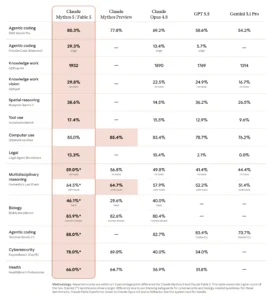
One nuance worth reading carefully in this part of the Claude AI guide, looking at the benchmark table above: the starred cybersecurity and biology results (such as the 78.0% on ExploitBench) reflect Mythos 5, not Fable 5. Because Fable 5’s safeguards fall back to Opus 4.8 on those exact topics, Fable 5’s effective score on cyber and biology questions tracks closer to Opus 4.8’s numbers (around 40% on ExploitBench). On everything else — coding, knowledge work, vision, computer use, health — Fable 5 and Mythos 5 are within a point or two of each other and clearly ahead of the field.
Claude AI Pricing Plans: Free, Pro, Max, Team, and Enterprise
Choosing the right plan is essential, and this section of the Claude AI guide breaks down exactly what you get at each tier of the lineup this Claude AI guide recommends. In 2026, Anthropic significantly expanded its free tier (memory rolled out to free users in March), widened the gap between Pro and Max for power users, made Enterprise self-serve so any organisation can buy directly online without a sales conversation, and removed the long-standing surcharge on API requests above 200K tokens — meaning the full 1M context window is now priced at flat standard rates. With the June launch, Fable 5 is also rolling into the paid subscription tiers (see the note below the table for the staged availability).
| Plan | Price | Key Features | Best For |
|---|---|---|---|
| Free | $0 | Sonnet 4.6, Projects, Artifacts, basic web search, app connectors, memory | Casual users, students, first-time AI explorers |
| Pro | $20/mo ($17 annual) | All Free + Opus 4.8, Fable 5 (staged), Claude Code, Cowork, Dispatch, Claude Design, unlimited projects, Research, more models, Claude in Excel, Claude in Chrome, file creation | Professionals, daily AI users, writers, developers |
| Max 5x | $100/mo | All Pro + 5x usage, higher output limits, priority access, Claude in PowerPoint, early access to new features | Power users, heavy coders, researchers |
| Max 20x | $200/mo | All Max 5x + 20x Pro usage, zero-latency priority, dynamic workflows in Claude Code with Opus 4.8 | Full-time AI-assisted workflows, intensive development |
| Team Standard | $25/seat/mo ($20 annual) | All Pro + admin controls, shared projects, collaboration, SSO, role-based access, no training on your data | Small to mid-sized teams (min 5 seats) |
| Team Premium | $150/seat/mo ($100 annual) | Adds Claude Code and Cowork, 5x more usage than Standard | Engineering and research teams needing high capacity |
| Enterprise (self-serve) | Purchased online, custom | 500K context, SCIM, audit logs, HIPAA-ready option, Analytics API, OpenTelemetry, role-based access controls | Mid-market and larger organisations buying directly |
| Enterprise (sales-led) | Custom pricing | Everything above plus custom deployment, data residency, dedicated account team | Global enterprises and regulated industries |
🚨 Fable 5 access on subscription plans is rolling out in stages. Anthropic expects very high, hard-to-predict demand, so from 9 June through 22 June 2026 Fable 5 is included on Pro, Max, Team, and seat-based Enterprise plans at no extra cost. On 23 June, it is removed from those plans, and using it afterward requires usage credits — Anthropic says it aims to restore Fable 5 as a standard part of subscription plans as quickly as capacity allows. On the Claude API and consumption-based Enterprise plans, Fable 5 is fully available now. If Fable 5 is essential to your workflow, plan around that 23 June checkpoint.
Two other 2026 changes are worth calling out in this Claude AI guide. Anthropic made Enterprise self-serve, so any organisation can sign up directly on the website without a sales conversation — a significant unlock for mid-market buyers. And memory is now available to every user, including the free tier, having previously been Pro-only. For most professionals who want to unlock the full range of Claude AI features, the Pro plan at $20/month hits the sweet spot between capability and cost: it now includes Opus 4.8, Fable 5 (during the included window), Cowork, Dispatch, Claude Code, and Claude Design on a single account.
Complete Claude AI Features Breakdown
This is the most comprehensive section of this Claude AI guide. Claude has evolved from a simple chatbot into a full productivity platform with close to 20 distinct Claude AI features. I will walk through each one in this Claude AI guide, explain what it does, and share tips for getting the most out of it. Whether you are looking for basic chat capabilities or advanced agentic workflows, the Claude AI features below will show you what is possible.
Projects: Organize Your Work Like a Pro
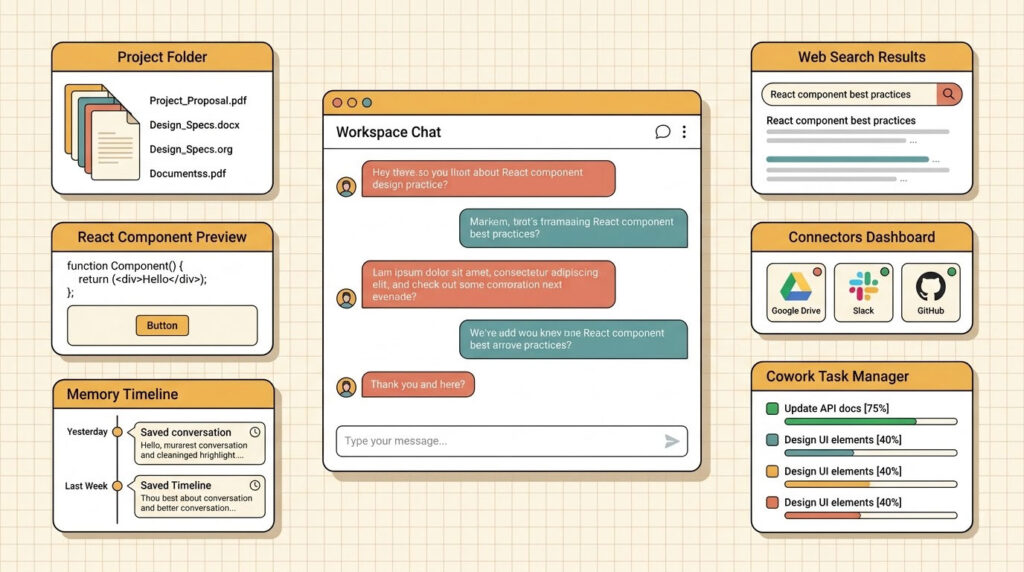
Projects, the first feature in this Claude AI guide‘s breakdown, let you organize conversations by topic or task with shared context. Inside a project, you can set custom instructions, upload reference documents (up to 200K tokens of project knowledge), and every new chat within that project inherits that context automatically. This is incredibly useful for ongoing work like content strategies, codebases, client accounts, or AI content strategy workflows.
For example, as I mention elsewhere in this Claude AI guide, I use a dedicated project for this blog with custom instructions covering formatting requirements, SEO guidelines, and internal link references. Every new post I work on automatically follows these standards without me re-explaining them each time. Projects are now available on all plans, including free, making them one of the most accessible Claude AI features for new users following this Claude AI guide.
Artifacts: Build Apps, Documents, and Visualizations
Artifacts transform Claude from a chat assistant into a creation platform. When you ask Claude to build something substantial, it generates the output in a side panel where you can interact with it in real time. This Claude AI guide highlights Artifacts as a standout feature because they support React components, HTML pages, SVG graphics, Mermaid diagrams, Markdown documents, and even downloadable files like .docx, .pptx, and .xlsx. Artifacts can also store and retrieve data across sessions through a key-value storage API, which is why journals, trackers, and small apps people build in Claude actually persist.
One of the most powerful Claude AI features is AI-powered Artifacts. You can build apps that embed Claude’s intelligence directly inside the artifact. For instance, a sales tool that analyzes transcripts and generates follow-up emails, or an interactive quiz that adapts to user responses — the kind of build this Claude AI guide encourages you to try. When you share AI-powered Artifacts, others can use them immediately without needing API keys, and the usage counts against their own subscription, not yours.
Memory: Claude Remembers Your Preferences
Memory, another feature this Claude AI guide rates highly, allows Claude to learn from your past conversations and remember details like your name, profession, preferences, communication style, and ongoing projects. As of March 2026, Memory is available to all users, including free-tier users. You can view, edit, and delete what Claude remembers in Settings, and you can also import memory from other AI providers to ease the transition.
Memory works by periodically generating insights from your chat history. These are stored as Claude’s memories about you, not raw transcripts. Memory is account-scoped, so nothing is shared with other users or visible to Anthropic outside safety review. Temporary Chat mode lets you have private conversations that never create memories. You can search past chats and reference previous conversations, which makes Claude feel more like a persistent collaborator than a stateless chatbot. For users following this Claude AI guide, enabling Memory early means Claude improves the more you use it.
Web Search: Real-Time Information Access
Claude can search the web in real time to access current information beyond its training data, a capability this Claude AI guide considers essential. This is a key capability covered in any thorough Claude AI guide because it closes the gap between static knowledge and live information. When you ask about recent events, live statistics, current prices, or the latest news, Claude automatically performs web searches, synthesizes information from multiple sources, and cites its references. Free users get basic web search, while paid plans offer more comprehensive search capabilities.
Extended Thinking: Deep Reasoning Mode
Extended Thinking is one of the most impactful Claude AI features for complex tasks. When enabled, Claude pauses to reason through multi-step logic internally before responding. This Claude AI guide recommends turning on extended thinking whenever you are working on math problems, debugging, strategic analysis, or any task where careful step-by-step reasoning matters. Adaptive thinking — where the model decides for itself when deeper reasoning will help — is now the default behaviour. With Opus 4.8 and Fable 5, you also get explicit, user-selectable effort control in claude.ai and Cowork, so you can dial reasoning up for hard problems or down for quick tasks. At the highest effort, Fable 5 reflects on and validates its own work before responding, which is what makes longer autonomous runs reliable.
Connectors and MCP: Integrate Your Favorite Tools
Connectors, covered next in this Claude AI guide, link Claude to external services through the Model Context Protocol (MCP), an open standard Anthropic developed for tool integration. Free users get basic app connectors for services like Google Drive, Gmail, Slack, Notion, and Google Calendar. Paid plans unlock full MCP support, including custom integrations and desktop extensions. The connector catalog now includes hundreds of options, from AWS Marketplace and Salesforce to DocuSign and FactSet.
MCP is a game-changer because it lets Claude not just talk about your data but actually access and act on it — a recurring theme in this Claude AI guide. Understanding MCP is essential to making the most of this Claude AI guide, as integrations dramatically expand what Claude can do for you. For example, you can tell Claude to check your Google Calendar, draft a reply in Gmail, or pull a specific document from Google Drive, all within a single conversation.
Skills: Teach Claude Repeatable Workflows
Skills are reusable sets of instructions that teach Claude how to perform specific tasks your way, and they are one of my favourite features in this Claude AI guide. Introduced in October 2025, Skills are among the most productivity-boosting Claude AI features because they go beyond custom instructions by loading on demand only when relevant, saving token costs and improving accuracy. You can create your own Skills, use partner-built Skills from the directory, or deploy Skills across your entire organization on Team and Enterprise plans.
For instance, a marketing team might create a “Brand Voice” Skill that encodes tone guidelines, while a legal department might have a “Contract Review” Skill that follows specific analysis criteria. This Claude AI guide strongly recommends experimenting with Skills early because they save enormous time on repetitive tasks. Skills also work inside Claude for Excel and PowerPoint, where they function as one-click automations. Anthropic ships prebuilt starter Skills targeting financial services workflows like DCF templates, LBO models, and investment banking deck reviews.

Claude Code: The AI Coding Assistant
Claude Code is an agentic command-line tool that lets developers delegate coding tasks directly from the terminal. Originally released in February 2025, Claude Code quickly became one of Anthropic’s most successful products, crossing $2.5 billion in run-rate revenue by April 2026, up from $1 billion in early January. Among the Claude AI features covered in this Claude AI guide, Claude Code stands out because it can read entire codebases, write and edit files, run tests, manage Git operations, debug issues, and handle complex refactoring across multiple files.
As this Claude AI guide noted in the models section, the Opus 4.8 update (28 May 2026) added dynamic workflows in research preview: a single orchestrator session decides at runtime how many subagents to spawn for a task, dispatches them in parallel, and synthesises the results — useful for large, parallelisable jobs like codebase-wide migrations. It also exposed user-selectable effort control and shipped code that is roughly four times less likely to let its own flaws pass unflagged. With Fable 5 now available on the API, Claude Code can take on even longer-horizon tasks: GitHub and Cursor both reported in early testing that Fable 5 handles complex, multi-step coding with a level of autonomy and reliability beyond previous models. Claude Code is available on Pro, Max, and Team plans, and also has autonomous AI agent capabilities for end-to-end task completion.
Cowork: Your AI Desktop Agent
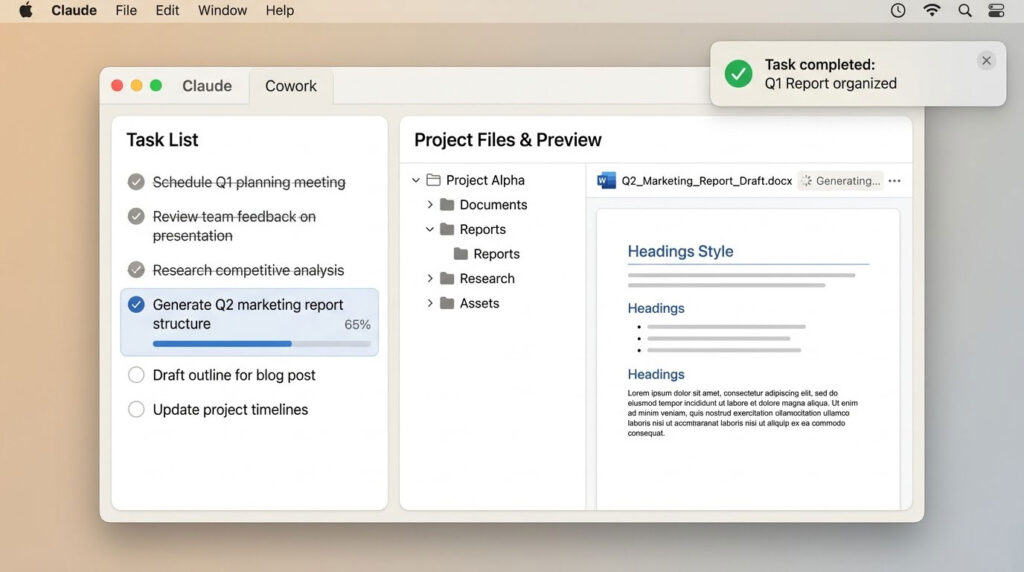
Cowork is arguably the most disruptive feature in this Claude AI guide. Launched in January 2026 as a research preview and now generally available on macOS and Windows in the Claude Desktop app, Cowork transforms Claude from a chat assistant into a desktop agent that can access your local files, execute multi-step tasks, create documents, organize folders, and automate workflows on your behalf. It runs on the same agentic architecture as Claude Code but is designed for non-coding tasks and wrapped in a user-friendly interface.
As this Claude AI guide emphasizes, Cowork represents a new category of Claude AI features where you give Claude access to a folder on your computer, describe what you need, and Claude makes a plan, breaks the work into subtasks, and executes them while keeping you informed. Cowork supports connectors (Google Drive, Gmail, DocuSign, Slack), plugins for domain-specific workflows, scheduled tasks that run automatically, and now user-selectable effort control. A Customize section in Claude Desktop groups skills, plugins, and connectors in one place. Two enterprise-grade additions are worth calling out: Cowork now ships with role-based access controls (admins can group users via SCIM and assign each group a custom role), OpenTelemetry support for monitoring activity, and an Enterprise Analytics API for usage and engagement data. Cowork was originally built in just two weeks using Claude Code itself, and its launch triggered a $285 billion selloff in enterprise software stocks as investors anticipated its disruptive potential.
Dispatch and Computer Use: Run Claude From Your Phone
Dispatch, launched on 23 March 2026, is the feature in this Claude AI guide I tell every Cowork user to turn on. It creates a single persistent conversation thread that syncs between the Claude mobile app on your phone and the Claude Desktop app on your computer. Fire off a task from your phone on the commute, come back to the finished work on your desktop. Your laptop must stay awake and logged in, but no separate setup is needed — Dispatch uses the same connectors, plugins, and file access you already configured in Cowork. Dispatch is available to both Pro and Max subscribers in research preview.
Pair Dispatch with computer use and you have something genuinely new among the Claude AI features currently shipping. Claude can now point, click, and navigate any app on your computer to finish a task when no native connector is available — opening files, using the browser, running dev tools, and updating spreadsheets. One demonstrated example: a user running late asks Claude to export a pitch deck as a PDF and attach it to a meeting invite, and Claude carries the task out end-to-end. The technology is built partly on Vercept AI, a computer-control startup Anthropic acquired roughly four weeks before launch — one of the more surprising stories in this Claude AI guide. Computer use is a research preview for Pro and Max on macOS and Windows; Claude requests permission before opening any new app, you can halt it at any point, and it always prefers structured connectors over raw screen control. Treat it as a productivity booster rather than a fire-and-forget tool for irreversible actions.

Claude Design: Prototypes, Slides, and One-Pagers
Claude Design is the newest member of the family covered in this Claude AI guide, launched by Anthropic Labs on 17 April 2026 and powered by Opus-class vision capabilities (now Opus 4.8 and Fable 5). You describe what you want in plain language — “prototype a calm mobile meditation app with muted greens and large typography” — and Claude produces an interactive design. You refine through conversation, inline comments, direct edits, or adjustment sliders Claude generates on the fly. Outputs export to PDF, PPTX, a hosted URL, or straight into Canva for collaborative editing. Designs that are ready to build can be handed off to Claude Code for implementation.
The differentiator among Claude AI features for visual work is the design system. During onboarding, Claude reads your codebase and design files and builds a team-specific system of colours, typography, and components that it applies automatically to every future project. As this Claude AI guide reads it, Anthropic positions Claude Design as complementary to Canva and Figma rather than a replacement — it is for the “idea to first draft” step, after which you hand off to a traditional design tool. On launch day, Figma’s stock dropped 7.28%, so the market clearly sees it as more than complementary. Claude Design is included with Pro, Max, Team, and Enterprise plans and is currently in research preview, with Enterprise off by default until an admin enables it.

Claude in Chrome: Browser Automation
Claude in Chrome is a browser extension that gives Claude the ability to see, navigate, and interact with web pages directly. As part of this Claude AI guide, it is worth highlighting that this feature is available in beta to all paid plan subscribers. With Claude in Chrome, you can automate browser tasks, fill out forms, upload images, debug web applications by reading console errors and DOM state, and record workflows for Claude to repeat.
The extension defaults to a fast model like Haiku 4.5 for browser-heavy tasks and lets you switch to other models for more complex work. It can juggle multiple browser tabs at once — drag tabs into Claude’s tab group and the agent sees and acts across all of them in a single step. This Claude AI guide recommends pairing Claude in Chrome with Cowork for maximum automation. Claude understands how to navigate popular sites like Slack, Google Calendar, Gmail, Google Docs, and GitHub without detailed instructions.
Claude for Excel and PowerPoint
Claude integrates directly into Microsoft Excel and PowerPoint as add-ins, two of the most practical integrations in this Claude AI guide. Both add-ins now share a single conversation thread, so context from an Excel analysis automatically carries over when you switch to building a PowerPoint presentation. Claude can create pivot tables, apply conditional formatting, build charts, and generate fully formatted slide decks. The add-ins also connect through an LLM gateway that supports AWS, Google Cloud, and Microsoft Foundry, which matters for organisations standardising on a specific cloud.
The shared context feature eliminates the tedious copy-paste-and-re-explain cycle that plagues most AI tools when switching between apps. If you work with data and presentations regularly, this Claude AI guide recommends exploring these add-ins early. Skills also work inside these add-ins, enabling one-click automations that your entire team can reuse.
File Creation and Code Execution
Claude can create and execute code within conversations, generating downloadable files including .docx, .pptx, .xlsx, .pdf, and various code files — one of the most practical capabilities in this Claude AI guide. This Claude AI guide includes this among the essential Claude AI features because it turns Claude into a document factory: describe what you need, and Claude writes, formats, and delivers a ready-to-use file. File creation is now available on all paid plans, including from the iOS and Android mobile apps, so you can produce a polished Word document or spreadsheet from your phone.
Inline Visualizations: Charts and Diagrams in Chat
One of the newest Claude AI features, rolling out in March 2026, is the ability to generate custom charts, diagrams, and interactive visualizations directly within the conversation. Unlike Artifacts (which open in a side panel), inline visualizations appear right in the chat flow, making explanations richer and more visual without interrupting the conversation. You can interact with these visualizations and modify them, and Claude will proactively create them when it identifies that a visual would enhance understanding. The Claude mobile app on iOS and Android can now also connect to fully interactive apps, so live charts, sketched diagrams, and shareable assets render visually right in the conversation on your phone.
Deep Research: Comprehensive Analysis
The Research feature enables Claude to conduct thorough, multi-step research on complex topics. This is one of the most powerful capabilities highlighted in this Claude AI guide for knowledge workers. Instead of a single web search, Claude performs dozens of searches, reads full articles, synthesizes information from multiple sources, and delivers a comprehensive report with citations. This is ideal for market analysis, competitive research, academic literature reviews, and any task requiring deep investigation. If you publish content, the same citation logic that powers Research is what gets you cited in generative engine optimization systems like AI Overviews and ChatGPT.
Claude Mythos and Project Glasswing
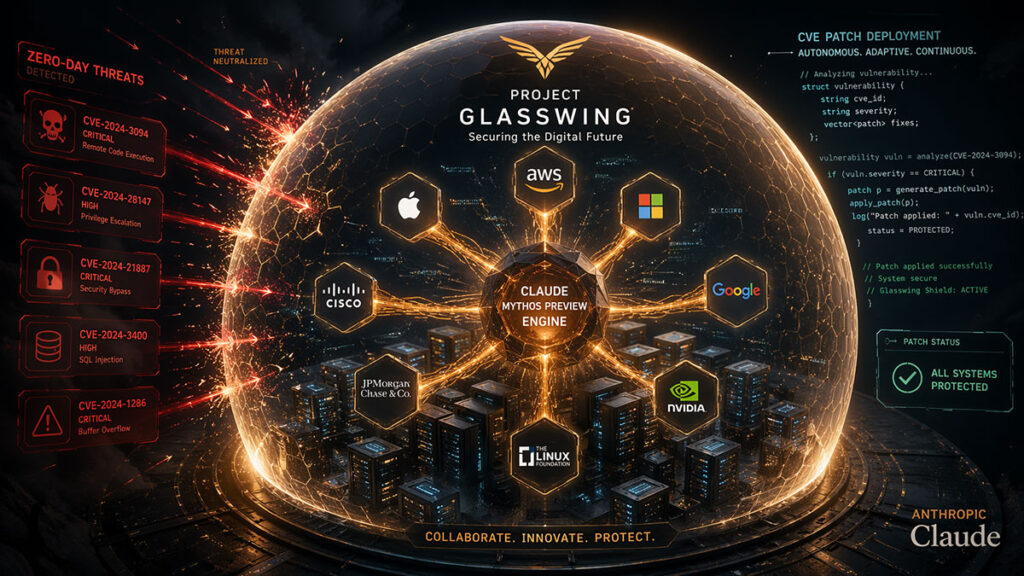
The story most mainstream Claude guides miss — and one this Claude AI guide covers in full — is Project Glasswing. Announced on 7 April 2026, it is an Anthropic-led initiative to secure the world’s most critical software using Mythos-class models. It began with Claude Mythos Preview and, as of 9 June 2026, upgrades partners to Claude Mythos 5 — the same model as Fable 5 but with cyber safeguards lifted, deployed in collaboration with the US government. Launch partners include AWS, Apple, Broadcom, Cisco, CrowdStrike, Google, JPMorgan Chase, Microsoft, NVIDIA, Palo Alto Networks, and the Linux Foundation, with access extended to roughly 150 organisations across more than fifteen countries that build or maintain critical infrastructure. Anthropic committed $100 million in model credits to cover Glasswing participants, plus direct donations to open-source security organisations.
The results, as this Claude AI guide tracks them, have been striking. In the early Mythos Preview phase, security researcher Nicholas Carlini said he found more bugs in a few weeks than in the rest of his career combined — including a 27-year-old vulnerability in OpenBSD. Mythos 5 carries the strongest cybersecurity capabilities of any model in the world, which is exactly why Anthropic keeps it gated: the same skills that help defenders find and fix zero-days could provide serious uplift to attackers. That tension is the reason Fable 5 ships with classifiers that block cyber, biology, chemistry, and distillation requests and fall back to Opus 4.8. Anthropic plans to broaden Mythos 5 access through a structured trusted-access program for cybersecurity organisations, and to open a separate trusted-access program that gives vetted biology researchers Fable 5 with the biology and chemistry safeguards removed. None of this sits in the standard Claude product surface, but it is shaping how the whole industry thinks about frontier AI and security.
Health Insights: Fitness and Wellness Data
On iOS and Android, Claude can read your health and fitness data through Health Connect (Android 14+) or Apple Health, rounding out the features in this Claude AI guide. This is one of the newer Claude AI features that this Claude AI guide tracks: ask Claude about your activity patterns, workout trends, sleep quality, and more, and it provides insights with native chart visualizations. Health features are available on Pro and Max plans and currently limited to US users.
Settings and Customization Options
Claude offers extensive customization through its Settings panel, and this Claude AI guide treats it as an often-overlooked advantage. Understanding these options helps you tailor the experience to your needs and is an often overlooked part of any Claude AI guide. You can customize your profile with personal preferences for tone, formatting, and feature usage. Claude uses these to personalize responses automatically. The Style feature lets you select or create custom writing styles that Claude applies to every conversation.
Key settings covered in this Claude AI guide include toggling web search, deep research, code execution, and Artifacts on or off per conversation, plus user-selectable effort control for Opus 4.8 and Fable 5. You can manage your Memory (view, edit, delete what Claude remembers, or import from other AI providers), configure connectors for third-party integrations, browse and install Skills, and manage Cowork-specific instructions. On the Claude Desktop app, the Customize section groups skills, plugins, and connectors in one place for easy management. Taking time to configure these Claude AI features to match your workflow is one of the highest-leverage actions you can take.
Claude AI Prompts: Best Practices and Examples
The quality of your results depends heavily on how you communicate with Claude. This section of the Claude AI guide covers proven Claude AI prompts techniques drawn from Anthropic’s own documentation and my hands-on experience. Mastering effective Claude AI prompts is the single biggest lever for improving output quality across every use case, and it matters even more with the newest models: Opus 4.8 and Fable 5 follow instructions more literally than older Claude models — they will not generalise an instruction from one item to another, and they will not infer requests you did not make.
The Contract-Style Prompt Structure
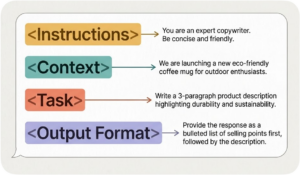
Claude interprets prompts as contracts: detailed agreements about task parameters, constraints, and expected outputs — the central idea behind the prompting advice in this Claude AI guide. Unlike some AI models that infer intent from vague requests, Claude performs best when you provide explicit, structured instructions. Anthropic recommends organizing your Claude AI prompts into four clear blocks.
The first block is Instructions, where you define the role and success criteria. The second is Context, where you provide relevant background information. The third is Task, where you specify the exact action you want Claude to perform. The fourth is Output Format, where you describe how the result should look. This Claude AI guide uses this structure in all of the Claude AI prompts examples below, and it works for everything from simple questions to complex agentic workflows.
Claude also responds exceptionally well to XML tags for separating different parts of your prompt. This Claude AI guide highlights XML as a key technique because wrapping context in <context> tags, examples in <example> tags, and instructions in <instructions> tags makes it significantly easier for Claude to follow complex multi-part Claude AI prompts reliably.
Practical Claude AI Prompt Examples
Here are practical Claude AI prompts examples across common use cases:
Content creation prompt:
You are an SEO content specialist. Write a 2,000-word blog post
targeting the keyword "ecommerce trends."

Context: The blog covers Saudi ecommerce and digital transformation.
The audience is ecommerce managers and brand owners in Saudi Arabia.

Task: Write a comprehensive, engaging post with H2/H3 headings,
comparison tables, and an FAQ section with 6 questions.

Output format: WordPress block editor HTML. Use first-person singular
voice. Include statistics with sources. Bold the keyword in key spots.
Code debugging prompt:
Review the following React component and identify why the state
updates are not triggering re-renders.

Constraints:
- Only fix the specific bug. Do not refactor or add features.
- Explain the root cause in 2-3 sentences before the fix.
- If unsure about the cause, say so explicitly.

[paste your code here]
Business analysis prompt:
Analyze the attached quarterly sales report. Identify the top 3
revenue growth opportunities and the top 3 risks.

For each finding:
- State the insight in one sentence
- Provide supporting data from the report
- Recommend a specific action

Format as a structured brief for a C-level executive.
Keep it under 500 words.
Research prompt with web search:
Research the current state of quick commerce in Saudi Arabia.
Search for the latest statistics, key players, and regulatory
developments.

Deliverable: A summary covering market size, growth rate, major
players (Nana, Jahez, HungerStation), and government initiatives.
Include dates and sources for every statistic cited.
Claude AI Dos and Don’ts
After extensive daily use, here are the most important dos and don’ts in this Claude AI guide for getting the best results from Claude. Following these tips will dramatically improve your experience and is a core part of this Claude AI guide.
| Do | Don’t |
|---|---|
| Be specific and explicit about what you want. State success criteria clearly. | Don’t assume Claude will infer your intent from vague prompts. Opus 4.8 and Fable 5 in particular follow instructions literally and will not infer requests you did not make. |
| Use XML tags to structure complex prompts for reliable results. | Don’t mix context, constraints, and output format into one unstructured paragraph. |
| Provide 1-2 examples (few-shot) of the output you want. Show, don’t just tell. | Don’t over-engineer with 10+ examples. Start with one and add more only if needed. |
| Give Claude permission to say “I’m not sure” to reduce hallucinations. | Don’t assume every response is factually correct without verification for critical tasks. |
| Use Projects with custom instructions for recurring tasks and ongoing work. | Don’t repeat the same context in every conversation. Set it once in a Project. |
| Use calm, clear language in your instructions. | Don’t use aggressive language like “CRITICAL!”, “YOU MUST”, or “NEVER EVER.” This overtriggers newer Claude models. |
| Start simple and add complexity only when needed. Test each addition. | Don’t try every prompting technique at once. Select techniques that address your specific challenge. |
| Use extended (adaptive) thinking and effort control for math, logic, debugging, and strategic analysis. | Don’t max out effort for simple questions. It adds latency without benefit for straightforward tasks. |
| Upload reference documents, images, and files directly for rich context. | Don’t try to describe complex documents verbally when you can simply attach them. |
| Choose the right model: Sonnet for everyday tasks, Opus 4.8 for complex reasoning, Fable 5 for the hardest long-horizon work, Haiku for speed. | Don’t default to the top model for everything. It is slower and uses more quota for tasks Sonnet handles equally well. |
| Use positive framing: “only use real data” outperforms “don’t use mock data.” | Don’t use negative instructions. Telling Claude not to do something forces it to process that concept first. |
| Iterate your prompts. The first attempt rarely produces the perfect result. | Don’t give up after one attempt. Refine your prompt based on the output you received. |
| Expect a Fable 5 fallback to Opus 4.8 on cyber, biology, and chemistry topics — and know you will be told when it happens. | Don’t assume a blocked or fallback response is a bug. It is a deliberate safeguard that triggers in under 5% of sessions. |
Top Claude AI Use Cases Across Industries
Claude’s versatility, as this Claude AI guide shows, makes it valuable across virtually every industry. Here are the most impactful use cases I have seen and tested, making this section of the Claude AI guide particularly practical for professionals evaluating how to integrate Claude AI features into their work.
Content creation and SEO: Claude excels at writing long-form blog posts, generative engine optimization content, product descriptions, email campaigns, and social media copy. Using the Claude AI prompts techniques from this Claude AI guide, you can produce content that is often described as more natural and human-like than competing models. Its ability to follow detailed formatting and style instructions makes it ideal for professional content workflows.
Software development: Claude is the top choice for AI-assisted coding, and Fable 5 has pushed that lead further — it leads on agentic coding benchmarks (80.3% on SWE-Bench Pro and 88.0% on Terminal-Bench 2.1) and, in early testing, compressed multi-month migrations into a single day for teams like Stripe. This Claude AI guide covers Claude Code in depth because it handles everything from building new features to debugging, testing, and code review. The Code Review feature integrates with GitHub to automatically analyze pull requests and surface logical errors, and Opus 4.8 is roughly four times less likely than its predecessor to let code flaws slip through.
Business analysis and strategy: Claude can analyze financial reports, competitive landscapes, market data, and internal documents. The 1 million token context window in the Opus line means it can process entire corporate document libraries in a single conversation, and Fable 5 set the highest knowledge-work score on Anthropic’s GDPval-AA benchmark. Teams at companies like Cognizant (350,000 staff) and Accenture (30,000 trained employees through the Claude Partner Network) use Claude for this purpose at scale.
Legal and compliance: Claude’s ability to process long legal documents, identify clauses, compare contract versions, and flag compliance risks makes it valuable for legal departments. Fable 5 leads Anthropic’s Legal Agent Benchmark, and early enterprise testers reported that in blind review, their lawyers found Fable 5’s redlines matched or beat their existing model every time. Its Constitutional AI framework, which provides transparent ethical alignment, is particularly appealing for regulated industries like healthcare, finance, and ecommerce in Saudi Arabia where ZATCA compliance matters.
Cybersecurity: Project Glasswing partners use Claude Mythos 5 — the strongest cybersecurity model in the world — to identify and fix zero-day vulnerabilities in critical infrastructure, while Fable 5’s safeguards keep those same capabilities out of the wrong hands by falling back to Opus 4.8. This is now one of the most consequential industry use cases for Claude in 2026.
Life sciences: Using Mythos 5, Anthropic’s protein-design experts accelerated parts of the drug-design process roughly tenfold, and the model produced novel molecular-biology hypotheses that scientists preferred about 80% of the time over Opus-class output. A planned biology trusted-access program will extend Fable 5 (with biology safeguards lifted) to vetted researchers to speed up therapeutic discovery.
Education and research: Claude leads in academic AI usage with a 41% share in university-affiliated applications. Students and researchers use it for literature reviews, study guide creation, complex problem solving, and research synthesis.
Ecommerce and marketing: From AI agents for ecommerce to customer service automation, the Claude AI features described in this Claude AI guide power product analysis, pricing optimization, inventory management, and personalized marketing at scale. Its integration with tools like Salesforce, Slack, and Shopify through MCP connectors makes it a natural fit for modern ecommerce operations.
Claude AI in Saudi Arabia and the MENA Region
Claude is officially supported in Saudi Arabia and across the Gulf, a point this Claude AI guide returns to for regional readers. You can sign up at claude.ai with a Saudi number, subscribe to Pro in local currency where supported, and access every surface covered in this Claude AI guide — including Fable 5, which Anthropic says is available everywhere from launch day — from Riyadh, Jeddah, Dammam, or anywhere else in the Kingdom. The Anthropic API is available via AWS Bedrock, Google Cloud Vertex AI, and Microsoft Foundry, all of which have Middle East regions. For organisations subject to data residency requirements, US-only inference is available at a 10% premium.
Three factors make Claude particularly relevant for Saudi businesses right now, and they are why I include a dedicated regional section in this Claude AI guide. First — and this is why this Claude AI guide keeps a dedicated MENA lens — Arabic performance is strong on both modern standard Arabic and major dialects, and Claude handles code-switched content well — useful for customer service, content, and marketing teams working in bilingual environments. Second, the 1 million token context window in Opus 4.8 and Sonnet 4.6 is long enough to load an entire corporate document library, which matters for organisations digitising legacy contracts, procurement records, or regulatory archives under Vision 2030 initiatives. Third, the sovereign AI story in the Kingdom is accelerating: PIF-backed HUMAIN has built its own national AI stack with ALLaM and HUMAIN ONE, but most commercial Saudi deployments I see in ecommerce, banking, and marketing still run on Claude, GPT, or Gemini through the major cloud providers. A realistic path for most brands is to combine Claude (or another frontier model) for general intelligence with ALLaM or HUMAIN Chat for sovereign-sensitive workloads, rather than choosing one over the other. I cover this hybrid architecture in depth in my sovereign AI Saudi Arabia guide.
For Saudi teams starting today, my suggested sequence: (1) put one Pro seat on every knowledge-worker team and default them to Sonnet 4.6, reaching for Opus 4.8 or Fable 5 on the hardest tasks, (2) build one Cowork workflow per team that replaces a recurring manual task, (3) train your engineers on Claude Code for greenfield and refactoring work, (4) use Claude Design for internal decks and prototypes, and (5) evaluate Team or Enterprise once you pass 5 paid seats or need SSO and admin controls. That sequence typically pays back inside the first month. If your team handles large ecommerce catalogues, read my AI shopping agents guide before you deploy Claude on customer-facing surfaces.

Claude AI vs ChatGPT: How They Compare
No Claude AI guide is complete without addressing the comparison everyone wants to know about. Both platforms are excellent, but as this Claude AI guide shows, they excel in different areas.
| Feature | Claude AI | ChatGPT |
|---|---|---|
| Top model | Fable 5 (Mythos-class, 9 June 2026); Opus 4.8 is the most capable Opus model | GPT-5.5 |
| Coding performance | Industry-leading; Fable 5 scores 80.3% on SWE-Bench Pro and 88.0% on Terminal-Bench 2.1 | Strong on terminal-heavy agentic coding (GPT-5.5 leads some terminal tasks) |
| Writing quality | Natural, nuanced, human-like | Strong creative writing, tends toward verbosity |
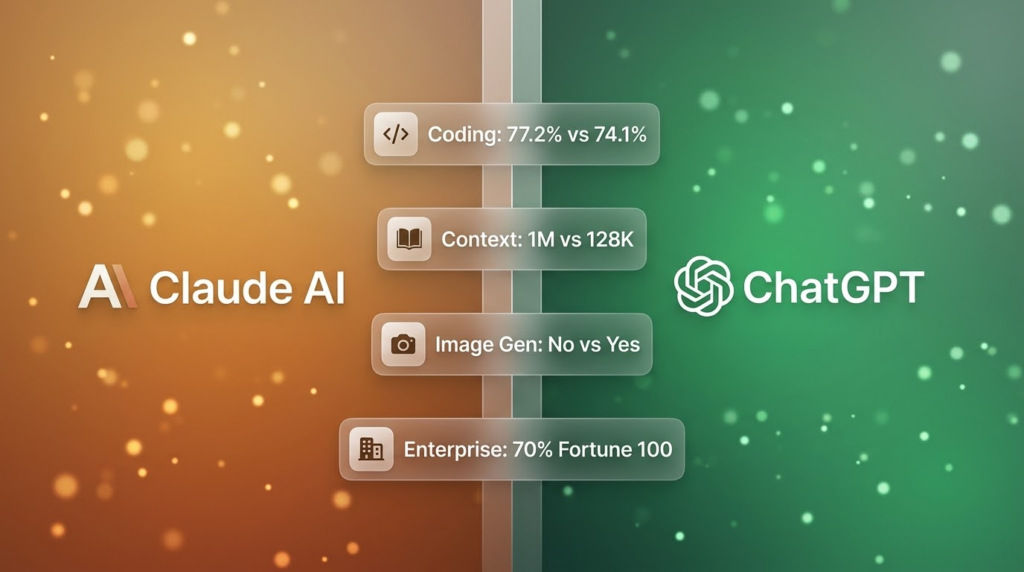
| Context window | 1M tokens on the Opus line (no surcharge above 200K since March) | ~400K tokens |
| Image generation | Not available natively | Built-in (DALL-E) |
| Vision | State-of-the-art with Fable 5 (rebuilds app code from screenshots) | Strong, multimodal |
| Safety approach | Constitutional AI; Fable 5 adds classifiers that fall back to Opus 4.8 on risky topics | RLHF + content filters |
| Desktop agent | Cowork (macOS + Windows, GA) | Operator (limited preview) |
| Browser automation | Claude in Chrome (paid plans) | ChatGPT browser tools |
| Phone-to-desktop control | Dispatch + computer use (Pro and Max) | Limited mobile-to-desktop handoff |
| Design tool | Claude Design (Opus-class vision) | None native |
| Pricing (Pro) | $20/month | $20/month (Plus) |
| Enterprise adoption | 70% Fortune 100, self-serve Enterprise available | Larger consumer base (200M+ weekly users) |
Claude wins on coding, long-document analysis, instruction following, agentic workflows, and enterprise safety. ChatGPT wins on image generation, plugin ecosystem breadth, and raw consumer market share. Many professionals use both: Claude for coding, writing, research, and document-heavy work; ChatGPT for image and voice-heavy workflows or broader consumer ecosystem integration. This Claude AI guide recommends trying both and choosing based on your primary workflow.
FAQ: Claude AI Guide
Is Claude AI free to use?
Yes, Claude offers a free tier that includes access to Claude Sonnet 4.6, Projects, Artifacts, basic web search, app connectors, and memory. The free plan has daily message limits that vary based on demand, but it is significantly more capable than the free tiers of most competing AI platforms. Features like Opus 4.8, Fable 5, Claude Code, Cowork, Dispatch, Claude Design, and effort control require a paid plan starting at $20/month. This Claude AI guide covers every plan in detail above.
What are Claude Fable 5 and Claude Mythos 5?
Launched together on 9 June 2026, Fable 5 and Mythos 5 are the headline additions to this Claude AI guide and the first models in Anthropic’s new “Mythos” tier, which sits above the Opus class in capability. They share the same underlying model. Fable 5 is the version made safe for general use: it is available to everyone, but ships with safeguards that automatically fall back to Claude Opus 4.8 on cybersecurity, biology, chemistry, and distillation requests (triggering in under 5% of sessions). Mythos 5 is the same model with those safeguards lifted, restricted to vetted cyber defenders through Project Glasswing. Both cost $10 per million input tokens and $50 per million output tokens — less than half the price of the earlier Mythos Preview.
What is the best Claude model for everyday use?
As this Claude AI guide recommends throughout, Claude Sonnet 4.6 is still the best choice for most everyday tasks. It offers near-Opus intelligence at faster speeds and lower cost, handling writing, coding, analysis, and research effectively. Step up to Opus 4.8 when you need more reasoning depth for complex problems, reach for Fable 5 for the hardest, longest-horizon work, and use Haiku 4.5 when speed and cost are your priorities.
What is Claude Opus 4.8 and how does it compare to Fable 5?
Claude Opus 4.8, a model this Claude AI guide returns to often, was released on 28 May 2026 and is the most capable model in Anthropic’s generally available Opus class. It keeps the 1 million token context window and $5 / $25 per-million-token pricing of Opus 4.7, but is more reliable — roughly four times less likely to let code flaws pass unflagged — and adds dynamic workflows in Claude Code, user-selectable effort control, and a cheaper Fast mode. Fable 5 sits one tier above it: Fable is more capable overall, but because its safeguards fall back to Opus 4.8 on sensitive topics, Opus 4.8 is effectively the model handling your cyber, biology, and chemistry questions. For everyday non-restricted work, Fable 5 is the stronger model; Opus 4.8 is the dependable workhorse beneath it.
What is Project Glasswing?
As this Claude AI guide explains above, Project Glasswing is an Anthropic-led cybersecurity initiative announced on 7 April 2026. It gives a limited group of partners — including AWS, Apple, Broadcom, Cisco, CrowdStrike, Google, JPMorgan Chase, Microsoft, NVIDIA, Palo Alto Networks, and the Linux Foundation, plus roughly 150 organisations across more than fifteen countries that build or maintain critical infrastructure — access to Anthropic’s most capable Mythos-class model. Those partners began upgrading from Claude Mythos Preview to Claude Mythos 5 on 9 June 2026. The models have already helped cyber defenders identify thousands of zero-day vulnerabilities, including a 27-year-old bug in OpenBSD. Mythos 5 is not available to the general public.
Can Claude generate images?
A question this Claude AI guide gets asked often: Claude cannot generate AI images natively like DALL-E or Midjourney. However, Claude can analyze and interpret images (photos, screenshots, charts, diagrams, PDFs) at high resolution — Fable 5 is state-of-the-art on vision and can even rebuild a web app’s source code from screenshots alone. It can also create programmatic visualizations through Artifacts and inline charts (SVG graphics, React components, Mermaid diagrams), produce visual designs and prototypes through the Claude Design product, and generate detailed image prompts you can use with external image generation tools.
How do I write effective Claude AI prompts?
Use the contract-style approach this Claude AI guide outlines: define the role and success criteria (Instructions), provide relevant background (Context), specify the exact task (Task), and describe the expected format (Output). The best Claude AI prompts use XML tags to separate sections, provide 1-2 examples of desired output, explicitly state constraints, and give Claude permission to express uncertainty rather than guessing. Start simple and add complexity only as needed. With Opus 4.8 and Fable 5, be especially explicit — they will not infer requests you did not make.
Is Claude better than ChatGPT?
Claude leads in coding benchmarks, instruction following, long-document processing (1M tokens vs ~400K), agentic workflows, and enterprise safety compliance. ChatGPT leads in image generation, audio capabilities, consumer ecosystem breadth, and overall user base. As this Claude AI guide explains, for professional coding and analysis work, Claude has an edge. For creative multimedia work, ChatGPT may be more versatile. Many professionals benefit from using both tools alongside the Claude AI prompts and Claude AI features covered here.
What is Claude Cowork and how does it work?
Cowork is a desktop agent feature covered extensively in this Claude AI guide that runs within the Claude Desktop app on macOS and Windows, generally available as of 2026. You give Claude access to a local folder, describe the task, and Claude plans, executes, and delivers finished work like organised files, formatted documents, and synthesised research. It is one of the most powerful Claude AI features for non-developers because it supports plugins, connectors, scheduled tasks, and now Dispatch, which lets you assign tasks from your phone and have Claude complete them on your computer while you are away. Cowork is available on all paid plans (Pro, Max, Team, Enterprise).
Is Claude AI available in Saudi Arabia?
Yes. As this Claude AI guide‘s regional section covers, Saudi Arabia is an officially supported country for both claude.ai and the Anthropic API. You can subscribe to any plan, including Enterprise (now self-serve online), and access Claude through AWS Bedrock, Google Vertex AI, and Microsoft Foundry regional endpoints. Fable 5 is available everywhere from its launch day. Arabic performance is strong on modern standard Arabic and major Gulf dialects, and US-only inference is available at a 10% premium for organisations with data residency requirements.
What does the Claude API cost?
Claude API pricing, the last topic in this Claude AI guide‘s FAQ, varies by model. Haiku 4.5 costs $1/$5 per million tokens (input/output), Sonnet 4.6 costs $3/$15, Opus 4.8 costs $5/$25, and both Fable 5 and Mythos 5 cost $10/$50 (Mythos 5 is restricted to Project Glasswing partners). The full 1M context window on the Opus line is priced at flat standard rates with no surcharge above 200K tokens. Anthropic also offers prompt caching (up to 90% off on repeated context) and Batch API processing (50% off) to reduce costs for high-volume use cases. Note that Mythos-class traffic (Fable 5 and Mythos 5) carries a mandatory 30-day data-retention policy on first- and third-party surfaces, used only for safety purposes.
Start Using Claude AI Smarter Today
Claude AI has evolved from a safety-focused research project into a comprehensive productivity platform that rivals and often surpasses ChatGPT in professional workflows — the throughline of this entire Claude AI guide. As this Claude AI guide demonstrates, the Claude AI features now available are staggering: Fable 5 bringing Mythos-class capability to everyone, Mythos 5 reshaping cybersecurity and life sciences through Project Glasswing, Opus 4.8 setting a new bar for reliability, Cowork automating desktop tasks, Dispatch extending that automation to your phone, Claude Design moving from idea to prototype in plain language, a 1 million token context window processing entire codebases, and Microsoft integrating Claude into its own Copilot product. The platform’s trajectory, as this Claude AI guide has shown, is clear.
The best way to start, as this Claude AI guide recommends, is straightforward: sign up for the free plan, explore Projects and Artifacts, experiment with Claude AI prompts using the contract-style structure from this Claude AI guide, and upgrade to Pro when you hit the usage limits or need Opus 4.8 and Fable 5-level reasoning. Use the dos and don’ts table as a reference for crafting better Claude AI prompts, and remember that the single most impactful improvement you can make is being explicit about what you want rather than hoping Claude will read between the lines.
If you are in Saudi Arabia’s growing digital economy, Claude’s capabilities align perfectly with the demands of modern ecommerce, content creation, and digital transformation. The tools are here. The question is how quickly you will put them to work.
Related reading:
- Best AI Models and Agents in 2026: Hands-On Pricing, Pros, Cons, and Comparison
- The Ultimate Guide to Autonomous AI Agents
- HUMAIN Saudi Arabia: The Complete Guide to the Kingdom’s Sovereign AI Champion
- AI Content Strategy: Proven Playbook to Skyrocket Ranking
- Jobs Replaced by AI: The Complete Guide to What’s Changing
- Best Custom GPTs in 2026: Top GPT Store Picks by Category
Sources: Anthropic official documentation (claude.com, support.claude.com, platform.claude.com), Anthropic blog posts including Claude Fable 5 and Claude Mythos 5 (9 June 2026), Claude Opus 4.8 (28 May 2026), Project Glasswing (7 April 2026), Claude Design (17 April 2026), Dispatch and computer use (23 March 2026), and Claude Partner Network (12 March 2026); Anthropic Fable 5 / Mythos 5 benchmark comparison and system card (June 2026); Wikipedia Claude article (June 2026); TechCrunch and The New Stack coverage of Opus 4.8 (28 May 2026); Bloomberg reporting on Anthropic revenue milestones (March-April 2026).

Husain Alhaboubi is Director of Digital Channels at Mobily, where he leads platform optimization, AI-powered customer engagement, and UI/UX strategy. With 20+ years of experience spanning eCommerce, IT infrastructure, and digital marketing, he previously drove a 225% revenue increase and 69% organic traffic growth as eCommerce Senior Manager at flyadeal, and managed enterprise IT operations — including data centers, ERP systems, and network security — as Group IT Manager at IPD Group.
Husain holds a BS in Information Systems from the University of Texas at Arlington and is certified in Google Ads, Google Analytics, and Semrush SEO. He writes from hands-on experience across both sides of digital business: the strategic (eCommerce, SEO, AI, digital transformation) and the technical (server administration, cloud computing, web development, networking, and security) — with a particular focus on the Saudi market and Vision 2030. Read his full resume →