
Best Custom GPTs in 2026: Top GPT Store Picks by Category
If you have been searching for a way to supercharge ChatGPT beyond its default capabilities, you are not alone. With over 800 million weekly active users and more than 3 million best custom GPTs created since launch, OpenAI’s GPT Store has become the go-to marketplace for specialized AI assistants. But here is the challenge: with over 159,000 public GPTs available, finding the ones that actually deliver results can feel like searching for a needle in a haystack. I have spent months testing dozens of custom GPTs across every major category, and in this guide, I am sharing the ones that genuinely stand out as ChatGPT tools worth your time.
Table of Contents
What Are Custom GPTs and Why Do They Matter?
A custom GPT is a specialized version of ChatGPT that has been tailored for a specific task, topic, or workflow. Unlike the standard ChatGPT interface where you start from scratch every time, custom GPTs come pre-loaded with instructions, domain-specific knowledge files, and configured capabilities that make them immediately useful for their intended purpose. Think of them as pre-built AI productivity tools that eliminate the need for complex prompt engineering.
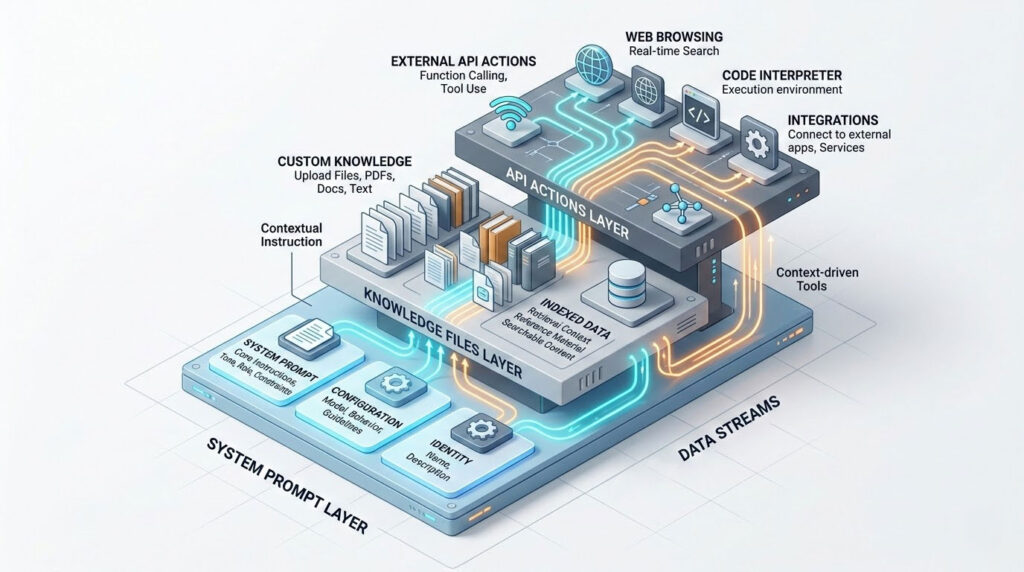
What makes custom GPTs so powerful is their three-layer architecture. First, they include a system prompt that defines behavior, tone, and rules. Second, they can incorporate uploaded knowledge files (PDFs, documents, datasets) that the GPT can reference through Retrieval-Augmented Generation (RAG). Third, they support custom actions that connect to external APIs, enabling real-world integrations like pulling live data, sending emails, or updating CRM records.
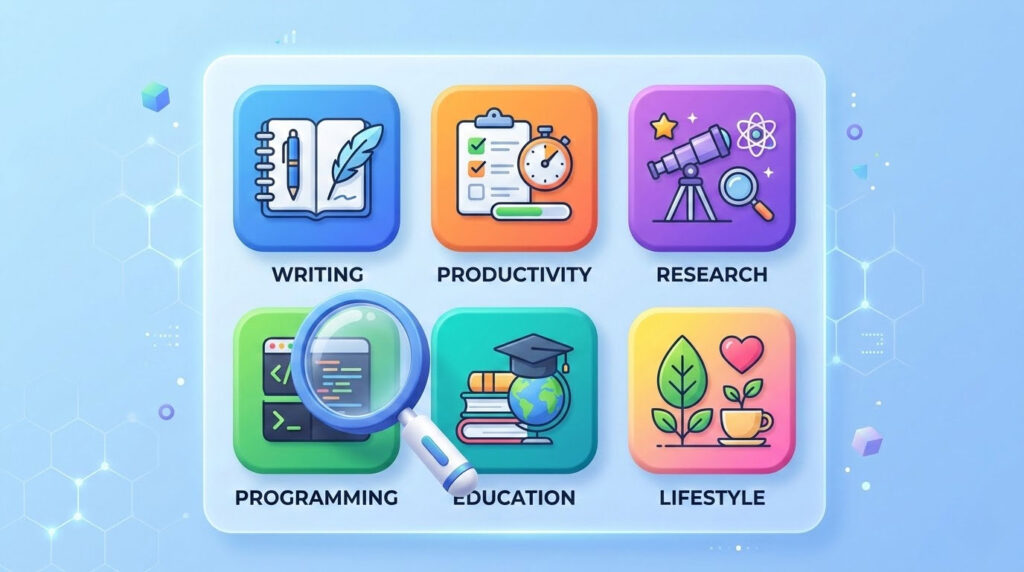
The scale of adoption tells the story. According to OpenAI, weekly users of custom GPTs and Projects grew 19x in 2025, and roughly 20% of all enterprise ChatGPT messages now route through a custom GPT or Project. The GPT Store itself hosts over 159,000 public GPTs across eight main categories: Top Picks, DALL-E, Writing, Productivity, Research & Analysis, Programming, Education, and Lifestyle. Whether you are a marketer refining SEO strategy, a developer debugging code, or a student preparing for exams, there is likely a purpose-built GPT ready to help.
From ChatGPT Plugins to Custom GPTs: What Changed
If you remember ChatGPT plugins, you might be wondering what happened. OpenAI officially deprecated the plugin system on April 9, 2024, replacing it entirely with custom GPTs and GPT Actions. The transition was not arbitrary. The original plugin ecosystem suffered from fragmentation, manual activation friction, and inconsistent quality across its 1,000+ offerings. Only power users engaged with plugins regularly, while the majority of ChatGPT users never touched them.
Custom GPTs solved these problems in several important ways. Plugins required third-party developers and coding expertise to build. Custom GPTs can be created by anyone using natural language, with no coding required. Plugins needed to be manually activated per conversation and could not communicate with each other. Custom GPTs stay persistent, combining multiple capabilities (web browsing, DALL-E, Code Interpreter, and external APIs) within a single assistant. The result is a far more seamless experience. If you previously relied on ChatGPT alternatives to plugins like WebPilot for browsing or Wolfram for calculations, those functions are now either built into ChatGPT natively or available through superior custom GPTs.
ChatGPT Built-In Features That Replaced Common Plugins
Before diving into the best custom GPTs, it is worth understanding what ChatGPT can now do natively without any GPT or plugin. Many features that once required separate plugins are now integrated directly into the platform.
| Built-In Feature | What It Replaced | What It Does |
|---|---|---|
| Web Browsing | WebPilot, Link Reader, KeyMate | Searches the live web and cites sources directly within conversations |
| DALL-E Image Generation | Image generation plugins | Creates and edits original images from text prompts inside the chat |
| Advanced Data Analysis (Code Interpreter) | Noteable, data analysis plugins | Uploads files, runs Python code, generates charts and visualizations |
| Vision (Image Input) | Image analysis plugins | Analyzes uploaded images, screenshots, diagrams, and handwritten notes |
| Advanced Voice Mode | Speechki and voice plugins | Natural spoken conversations with real-time voice interaction |
| Canvas | Writing and coding editor plugins | Side-by-side editing workspace for collaborative writing and coding |
| Memory | Custom Instructions (limited) | Remembers your preferences, context, and facts across conversations |
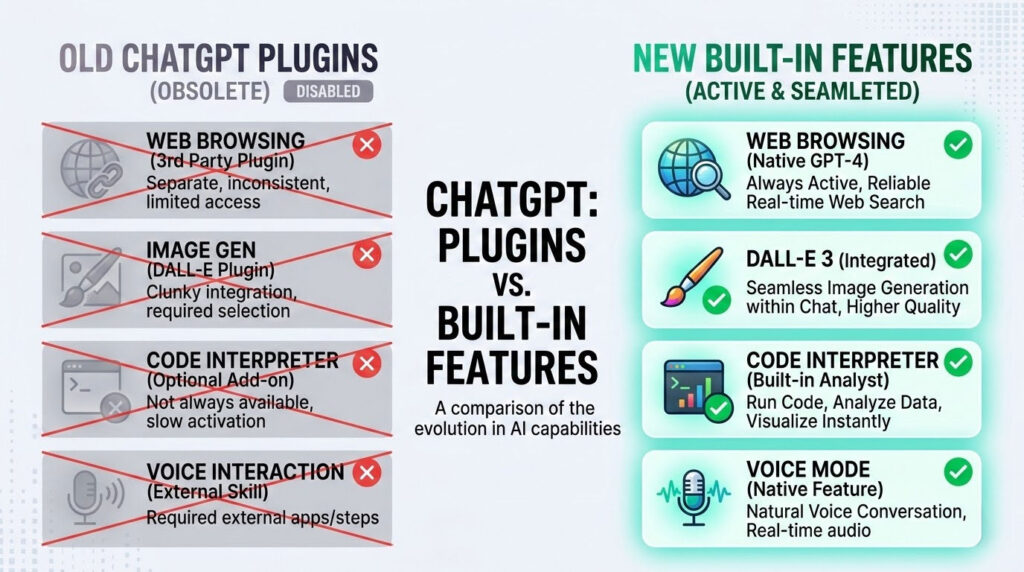
These native features work automatically for ChatGPT Plus, Pro, Team, and Enterprise subscribers. No installation or activation required. For many everyday tasks, you may not need a custom GPT at all. However, when you need specialized AI assistance that goes beyond general-purpose capabilities, that is where the GPT Store shines.
Best Custom GPTs for Writing and Content Creation
Content creation is the most popular use case on the GPT Store, and for good reason. A well-configured writing GPT can cut content production time by 30 to 45 minutes per piece compared to prompting generic ChatGPT. Here are the standout ChatGPT tools for writers.
Write For Me
This is one of the most widely used GPTs on the platform. Write For Me handles everything from blog posts and essays to tutorials and long-form articles. You provide a title, topic, or outline, and it generates structured, readable content. It also supports table generation and allows you to specify word count, tone, and purpose. The key advantage over vanilla ChatGPT is that it maintains consistent formatting and structure across multiple outputs, which is particularly useful for building an AI content strategy.
Creative Writing Coach
Unlike most writing GPTs that generate content for you, this one helps you become a better writer. It provides nuanced feedback on narrative structure, character development, pacing, and stylistic elements. I find it particularly useful for refining drafts rather than creating them from scratch. Upload your manuscript or paste a chapter, and it delivers the kind of editorial feedback you would expect from a professional writing workshop.
Humanizer Pro
A practical reality of using AI for content: sometimes the output reads too robotic. Humanizer Pro rewrites AI-generated text to sound more natural and conversational while preserving the original meaning and quality. It is especially useful for marketers and bloggers who use AI for first drafts but want the final output to pass AI detection tools and, more importantly, connect with human readers.
Best Custom GPTs for SEO and Digital Marketing
For digital marketers, SEO-focused GPTs are among the most valuable AI productivity tools in the GPT Store. They bridge the gap between expensive enterprise SEO platforms and manual analysis.
SEO GPT by Writesonic
This GPT evaluates articles for search engine optimization, performs technical website analysis, identifies trending keywords, and helps with competitor research. You do not need to be an SEO expert to use it. Provide a URL or article text, and it delivers actionable recommendations for improving rankings. It is particularly strong for on-page SEO analysis and content gap identification.
SEO Core AI
A more advanced option that goes beyond traditional SEO. SEO Core AI performs comprehensive website audits designed for both Google and AI search engines like Generative Engine Optimization platforms. It analyzes your AI visibility, on-page factors, and competitor citations, making it one of the few GPTs that addresses the emerging GEO landscape alongside traditional search.
Marketing Strategy Advisor
This GPT functions like an extra team member for small marketing teams. Brief it with your business details, target audience, and expertise area, and it processes campaign performance data to identify trends, provide correlation insights, and suggest data-backed next steps. It is an excellent starting point for businesses that lack access to premium analytics tools.
Best Custom GPTs for Coding and Development
Developers were early adopters of custom GPTs, and the programming category remains one of the most active on the GPT Store. According to usage data, coding assistance accounts for approximately 14% of all ChatGPT queries.
Code Copilot
This GPT acts as a pair programming partner that reviews code, suggests improvements, identifies bugs, and helps with refactoring. It supports a wide range of languages including Python, JavaScript, TypeScript, Go, Rust, and more. Where it excels over vanilla ChatGPT is in maintaining context across long coding sessions and providing structured, well-commented output.
Grimoire
Grimoire is a full-stack web development GPT that can generate entire websites, apps, and components from natural language descriptions. It is popular among both beginners who need functional prototypes quickly and experienced developers looking to scaffold projects faster. Its structured output and step-by-step approach make it one of the best custom GPTs for web development tasks.
API Docs GPT
Every developer has spent hours navigating sprawling API documentation. This GPT streamlines the process by ingesting API docs and answering questions about endpoints, authentication, rate limits, and implementation patterns in plain language. It is a significant time-saver when you are integrating a new service or debugging API calls.
Best Custom GPTs for Productivity and Business
The productivity category includes some of the most practically useful GPTs on the platform. These ChatGPT tools are designed to automate repetitive business tasks and streamline workflows.
Zapier AI Actions
Zapier’s integration with ChatGPT connects you to over 6,000 apps including Google Calendar, Notion, Slack, HubSpot, and Salesforce. Instead of just answering questions, ChatGPT can pull real data, update records, schedule meetings, and move information between platforms automatically. You can issue multi-step commands and the GPT builds the automation logic for you. This is arguably the most powerful custom GPT for business process automation.
AskYourPDF
This GPT lets you interact with any PDF document through conversation. Upload contracts, research papers, financial reports, or technical documentation, and ask questions in natural language. It extracts key information, summarizes sections, and can compare multiple documents. For professionals who regularly process lengthy PDFs, this is a significant workflow improvement.
Presentation GPT
Creating slide decks is one of those tasks that consumes far more time than it should. This GPT generates professional presentation outlines, slide content, and speaker notes from a brief description or uploaded document. While it does not replace dedicated design tools like PowerPoint or Canva, it dramatically reduces the time spent on content structuring and copywriting for presentations.
Best Custom GPTs for Data Analysis and Research
Data analysis GPTs have become essential for professionals who need to work with datasets but do not have deep technical expertise. These are among the best custom GPTs for anyone working with numbers, and they leverage ChatGPT’s Code Interpreter to process, analyze, and visualize data.
Data Analyst GPT
Drop in any CSV, Excel, or JSON file, and this GPT performs comprehensive data analysis. It identifies trends, creates visualizations, runs statistical tests, and generates summary reports. The interactive nature means you can ask follow-up questions, request different chart types, or drill into specific subsets of your data. It turns ChatGPT into a genuine analytics companion.
Consensus GPT
For anyone who needs research backed by peer-reviewed science, Consensus connects ChatGPT to a database of over 200 million academic papers. Instead of getting generic answers that might include hallucinated citations, your responses are grounded in actual scholarly research. This makes it invaluable for academics, healthcare professionals, and anyone who needs verifiable, evidence-based information.
ScholarAI
Similar to Consensus but with a different approach, ScholarAI provides fast and reliable access to peer-reviewed data. It is especially useful for literature reviews, finding supporting evidence for arguments, and staying current with the latest research in any field. The GPT can search by topic, author, or specific research questions.
Best Custom GPTs for Creative Design and Image Generation
While ChatGPT’s built-in DALL-E handles basic image generation, specialized creative GPTs take visual output to a much higher level. These are the best custom GPTs for designers, marketers, and content creators who need professional visuals.
DALL-E GPT
The official DALL-E custom GPT from OpenAI offers a more refined image generation experience than using DALL-E directly through the standard chat. It is better at interpreting creative briefs, maintaining stylistic consistency across multiple images, and generating variations. For marketers and content creators who regularly need branded visuals, social media graphics, or blog illustrations, this GPT streamlines the creative process.
Canva GPT
The Canva integration within ChatGPT lets you generate presentations, marketing materials, social media posts, infographics, and business cards through conversational prompts. The output transfers directly to Canva’s platform for further customization. This is especially valuable for small teams that need professional designs without a dedicated designer.
Image Generator Pro
This GPT focuses on generating highly detailed prompts that produce better AI-generated images. Whether you are using DALL-E, Midjourney, or Stable Diffusion, it helps you craft prompts that result in more precise, professional-quality outputs. It understands artistic styles, composition principles, and technical photography terms.
Best Custom GPTs for Education and Learning
Education is one of the fastest-growing categories in the GPT Store, with some of the best custom GPTs focused on tutoring, exam preparation, and skill development.
Tutor Me
Built for personalized learning, this GPT adapts its teaching style to your level and preferred learning method. It covers subjects from mathematics and science to languages and history. Rather than just giving answers, it guides you through problem-solving processes, asks clarifying questions, and provides practice exercises. It is like having an on-demand private tutor available 24/7.
Language Teacher
This GPT provides structured language lessons, grammar explanations, vocabulary building, and conversational practice. It supports multiple languages and adjusts difficulty based on your proficiency. Combined with ChatGPT’s Advanced Voice Mode, it creates an immersive language learning experience that rivals dedicated language apps.
Smart ESL Teaching Assistant
For English language teachers, this GPT creates learning materials that adapt to various proficiency levels. It generates lesson plans, exercises, comprehension questions, and assessment materials. Teaching professionals report significant time savings on material preparation, allowing more focus on actual classroom engagement.
How to Create Your Own Custom GPT (Step-by-Step)
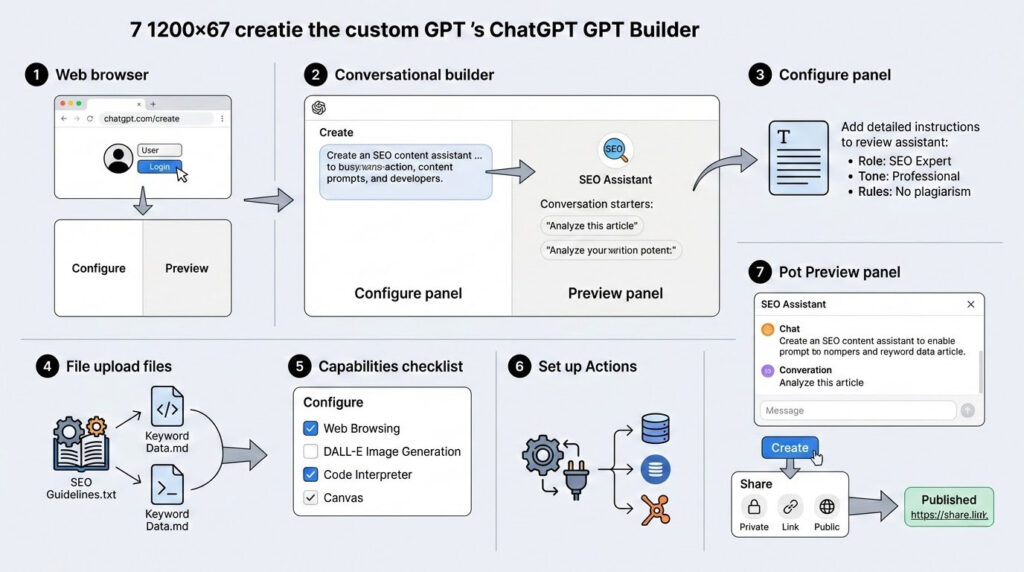
One of the most exciting aspects of custom GPTs is that you can build your own without writing a single line of code. All you need is a ChatGPT Plus, Pro, Team, or Enterprise subscription. Here is the process.
Step 1: Open the GPT Builder. Navigate to chatgpt.com/create and log in. You will see a split-screen interface with a Create tab (conversational builder) and a Configure tab (manual settings).
Step 2: Define the purpose. In the Create tab, describe what your GPT should do in plain language. For example: “Create an SEO content assistant that analyzes articles, suggests keyword improvements, and generates meta descriptions.” The builder will suggest a name, profile picture, and conversation starters.
Step 3: Configure the instructions. Switch to the Configure tab for maximum control. Write detailed behavioral instructions including the GPT’s role, tone, rules, what it should and should not do, and the desired output format. The more specific your instructions, the more consistent and useful the GPT will be.
Step 4: Upload knowledge files. Add relevant documents, guides, datasets, or reference materials. These files give your GPT domain-specific knowledge that the base ChatGPT model does not have. Use text-based files (TXT with Markdown headers) rather than PDFs for better parsing accuracy.
Step 5: Enable capabilities. Choose which built-in tools your GPT can access: Web Browsing, DALL-E Image Generation, Code Interpreter, and Canvas. Enable only what your GPT needs to avoid confusion.
Step 6: Set up Actions (optional). If your GPT needs to connect to external services, you can configure custom actions using API specifications. This enables integrations with databases, CRM systems, analytics platforms, and other tools.
Step 7: Test and publish. Use the Preview panel to test your GPT with real scenarios. Once satisfied, click Create and choose your sharing preference: Only Me, Anyone with a Link, or Public (listed in the GPT Store).
You might also find it helpful to use the AI Prompt Builder tool to craft and refine the instructions for your custom GPT before pasting them into the builder.
Custom GPT Best Practices and Tips for Better Results
After extensive testing, these are the practices that consistently produce the best custom GPTs with reliable, high-quality output.
Be laser-specific with instructions. Instead of “You are a support assistant,” write something like: “You are the customer support agent for [Company]. You respond exclusively about products from the current catalog. If the user asks about topics outside your scope, you indicate that you cannot help and offer to connect with the human team. Professional tone, concise responses, maximum 3 paragraphs.” Specificity eliminates hallucinations and off-topic responses.
Use small, focused knowledge files. Avoid uploading massive documents. Break your knowledge base into smaller, well-organized files with clear headers. AI models parse structured text approximately 3x better than unstructured PDFs.
Define the output format explicitly. If you need information in a specific layout (tables, JSON, numbered lists, specific section headers), state that clearly in your instructions. This saves time on post-processing and ensures consistency.
Build in review checkpoints. For multi-step workflows, instruct your GPT to pause and ask for user input between steps rather than running through everything automatically. This keeps you involved in the process and catches errors early.
Test with edge cases. Before publishing, test your GPT with unusual inputs, ambiguous questions, and requests outside its intended scope. A well-built GPT should handle these gracefully rather than producing irrelevant or incorrect output.
Common Mistakes to Avoid With Custom GPTs
Even experienced users fall into these traps when working with custom GPTs and the GPT Store. Avoiding these pitfalls is the difference between finding the best custom GPTs and wasting time on underwhelming tools.
Trusting outputs without verification. Custom GPTs are powerful but not infallible. GPT models can still hallucinate, especially when asked about specific facts, statistics, or recent events. Always verify critical information, particularly for legal, financial, or medical contexts.
Overloading knowledge files. More data does not always mean better performance. Uploading too many large files can confuse the retrieval process and lead to less relevant responses. Curate your knowledge base carefully.
Ignoring security considerations. A 2025 study found that 95% of the 14,904 custom GPTs examined lacked sufficient security protection. If you share a GPT with “Can view settings” permissions, others can see your entire instruction prompt and download your knowledge files. Use “Can chat” only for broader team access and reserve settings access for trusted collaborators.
Using the Create tab for complex GPTs. The conversational Create tab is great for quick setups, but it does not offer full control over formatting, behavior rules, or layered logic. For any GPT intended for professional use, switch to the Configure tab and write your instructions manually.
Not iterating after launch. The first version of your custom GPT is rarely the final version. Collect feedback from users, test new scenarios, and refine your instructions and knowledge base over time. The best GPTs on the store are the result of continuous iteration.
FAQ: Best Custom GPTs
Are custom GPTs free to use?
You can use existing custom GPTs with a free ChatGPT account, though with limited access to the GPT-4o model. Creating and publishing your own custom GPTs requires a paid subscription: ChatGPT Plus ($20/month), Pro ($200/month), Team ($25/user/month), or Enterprise (custom pricing). Free-tier users have usage caps that limit how many GPT interactions they can have per day.
What is the difference between ChatGPT plugins and custom GPTs?
ChatGPT plugins were third-party extensions that required developers to build and were manually activated per conversation. OpenAI deprecated plugins in April 2024 and replaced them with custom GPTs, which are more flexible, easier to create (no coding needed), and integrate all ChatGPT capabilities in a single persistent assistant. Custom GPTs also support knowledge file uploads and custom API actions, making them far more powerful than the original plugin system.
How many custom GPTs are available in the GPT Store?
As of 2026, OpenAI reports that over 3 million custom GPTs have been created. However, the public GPT Store contains approximately 159,000 public GPTs. The difference accounts for private GPTs, internal enterprise GPTs, and GPTs shared only via direct link. The store organizes them into eight main categories: Top Picks, DALL-E, Writing, Productivity, Research & Analysis, Programming, Education, and Lifestyle.
Can custom GPTs access the internet and pull live data?
Yes. If the GPT creator enables the Web Browsing capability, the custom GPT can search the internet and retrieve current information. Additionally, GPTs with custom actions can connect to external APIs to pull live data from databases, CRM systems, analytics platforms, and other services. This makes them far more useful than static chatbots for tasks that require up-to-date information.
Are conversations with custom GPTs private?
Your chats with custom GPTs are not shared with the GPT builder. OpenAI retains conversations for 30 days for abuse monitoring purposes. If a GPT uses third-party APIs, you choose whether data can be sent to that API. Team and Enterprise plans do not use your data for model training and offer additional security features like SOC 2 compliance and SSO.
Can I use custom GPTs on mobile devices?
Yes, you can access and use custom GPTs through the ChatGPT mobile app on both iOS and Android. However, creating and editing custom GPTs is currently only available on the web at chatgpt.com. Once created, your GPTs appear in the sidebar menu on all devices, and you can also invoke them using the @ mention feature in any ChatGPT conversation.
Can you make money from building custom GPTs?
OpenAI has a revenue-sharing program for GPT builders, but the earning potential for most individual creators is modest, typically ranging from $100 to $500 per month unless your GPT reaches the top 0.01% of engagement. The real revenue opportunity in 2026 lies in B2B consulting: building internal GPTs for enterprises that need custom HR onboarding agents, legal discovery tools, or compliance automation trained on proprietary data. These consulting engagements typically command $5,000 to $20,000 for setup plus $1,000 to $5,000 monthly for maintenance.
Start Using the Best Custom GPTs Today
The GPT Store has evolved from a novelty into a genuine ecosystem of specialized AI productivity tools. Whether you need help with writing, SEO, coding, data analysis, or business automation, there is a custom GPT built for your exact use case. The platform now serves over 800 million weekly active users and processes 2.5 billion prompts daily, which means these tools are being battle-tested at massive scale.
My recommendation is to start simple. Test the native built-in features first, since many tasks that once required plugins or GPTs are now handled automatically. Search the GPT Store second for any specialized needs. And if you cannot find exactly what you need, build your own custom GPT. The creation process takes minutes, not days, and the return on investment in saved time is immediate.
As AI models and agents continue to advance, custom GPTs are evolving from simple chatbot wrappers into agentic mini-apps that execute multi-step workflows autonomously. The builders and businesses investing in this ecosystem now will have a significant advantage as AI becomes further embedded in everyday work.
Related reading:
- The Ultimate Guide to Autonomous AI Agents
- AI Content Strategy: Proven Playbook to Skyrocket Ranking
- Best AI Models and Agents in 2026: Hands-On Pricing, Pros, Cons, and Comparison
- Generative Engine Optimization for Ecommerce: The Complete 2026 Guide
- AI Agents for eCommerce: Automate Inventory, Customer Service, and Pricing
Sources: OpenAI GPTs Announcement, DemandSage ChatGPT Statistics 2026, SEO.ai GPT Store Statistics, Chad Wyatt ChatGPT Statistics, Coursera ChatGPT Plugins Guide, OpenAI Help Center: Creating a GPT

Husain Alhaboubi is Director of Digital Channels at Mobily, where he leads platform optimization, AI-powered customer engagement, and UI/UX strategy. With 20+ years of experience spanning eCommerce, IT infrastructure, and digital marketing, he previously drove a 225% revenue increase and 69% organic traffic growth as eCommerce Senior Manager at flyadeal, and managed enterprise IT operations — including data centers, ERP systems, and network security — as Group IT Manager at IPD Group.
Husain holds a BS in Information Systems from the University of Texas at Arlington and is certified in Google Ads, Google Analytics, and Semrush SEO. He writes from hands-on experience across both sides of digital business: the strategic (eCommerce, SEO, AI, digital transformation) and the technical (server administration, cloud computing, web development, networking, and security) — with a particular focus on the Saudi market and Vision 2030. Read his full resume →