

How to Build an Autonomous AI Company in 2026: The Complete Blueprint
An autonomous AI company is a business that runs its everyday operations with a team of AI agents instead of a team of people. In 2026, this stopped being science fiction. I have watched every piece click into place, and in this guide I will show you, step by step, exactly how one is built.
The idea sounds intimidating, but it is simpler than it looks. Think of a normal company: a founder sets direction, employees handle marketing, sales, finance, and support, and everyone follows the same playbook. An autonomous AI company keeps that exact structure — it just replaces the employees with AI agents that work around the clock, never forget an instruction, and cost a fraction of a salary.
By the end of this article you will know how to set up the “brain” in Obsidian, build a Jarvis-style assistant you can text like a person, wire up the agents in a no-code tool, add the safety controls, and follow a day-by-day 30-day plan — with real, numbered steps, not vague theory. I have kept everything beginner-friendly and vendor-neutral, so it applies whether you run one website or a hundred.
Table of Contents
What Is an Autonomous AI Company?
An autonomous AI company is not a single chatbot. It is a coordinated system of specialized AI agents, each responsible for one job, all sharing the same company knowledge and working together without you steering every step. One agent writes and publishes content, another manages ads, another answers customer emails, another tracks the money — the same way departments work in a real business.
The key word is autonomous. A normal AI tool waits for you to type a prompt. An agent inside an autonomous AI company is given a goal and the tools to reach it, then it decides the steps on its own — searching, writing, calling other software, and reporting back when it is done. If that concept is new to you, my complete guide to autonomous AI agents explains how a single agent thinks before you scale up to a whole team.
Let me be honest about the limits, because the hype online is misleading. A well-built autonomous AI company can handle roughly 85–90% of routine operations on its own. The remaining 10–15% — big strategic calls, brand creativity, sensitive decisions, and quality control — still needs you. The goal is not zero humans. The goal is freeing yourself from repetitive work so your time goes to the decisions that actually matter.
Why This Became Possible in 2026
People have dreamed about AI employees for years, so why is 2026 the moment an autonomous AI company finally works? Two things changed. First, the models got good enough to plan and use tools reliably. Second — and this is the part most guides miss — the industry agreed on a common way for AI to plug into other software.
The numbers show how fast this is moving. Gartner expects 40% of enterprise applications to include task-specific AI agents by the end of 2026, up from less than 5% in 2025. The agentic AI market is worth roughly $10 billion in 2026 and is growing more than 40% a year. On the ground, the everyday tools matured too: Obsidian, the notes app many people now use as an AI “brain,” crossed 1.5 million users in early 2026, and open-source “Jarvis” assistants exploded in popularity. Building an autonomous AI company is no longer a fringe experiment; it is becoming standard practice.
The missing puzzle piece was the Model Context Protocol (MCP), an open standard Anthropic released in late 2024 that lets any AI model connect to any tool through one common “plug.” Think of it as USB-C for AI. It caught on so quickly that in December 2025 Anthropic handed it to the Linux Foundation to govern as a neutral, industry-wide standard, and its software kits now see around 97 million downloads a month. Because of MCP, your AI can safely read your files, your CRM, and your website without a custom-built connection for each one. I break the standard down further in my post on MCP for ecommerce.
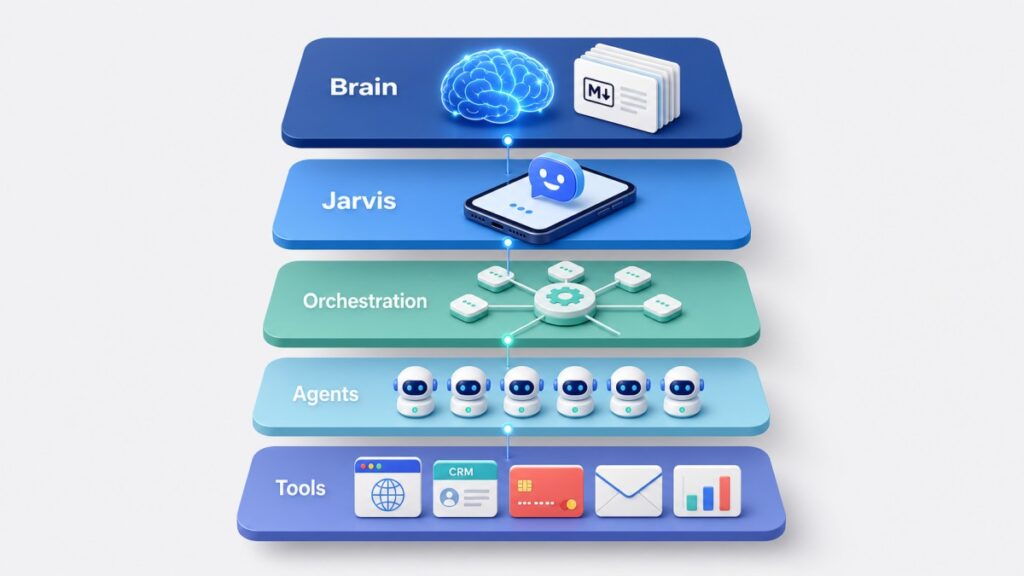
The 5-Layer Architecture at a Glance
Every autonomous AI company I have studied is built from the same five layers. Picture them like a living organism: a brain that remembers and thinks, a voice you talk to, a nervous system that carries messages, a workforce that does the tasks, and hands that touch the real tools.
| Layer | Its role | What it actually is |
|---|---|---|
| Layer 1 — The Brain | Memory and intelligence | An Obsidian vault (your notes) + Claude, connected via MCP |
| Layer 2 — Jarvis | The command layer | A chat assistant you text to run the whole company |
| Layer 3 — Orchestration | The nervous system | n8n, an automation tool that runs the jobs |
| Layer 4 — The Workforce | Your employees | Specialized AI department agents |
| Layer 5 — Execution | The hands | Your real tools: website, CRM, payments, ads, email |
The magic is in how they connect. A trigger — a scheduled time, a new order, or a message you send Jarvis — reaches the orchestration layer, which wakes up the right agent. The agent consults the brain for context, does its job using the real tools, and logs the result back to the brain. Then it goes quiet until the next trigger. Let me walk you through each layer of the autonomous AI company with the actual setup steps.
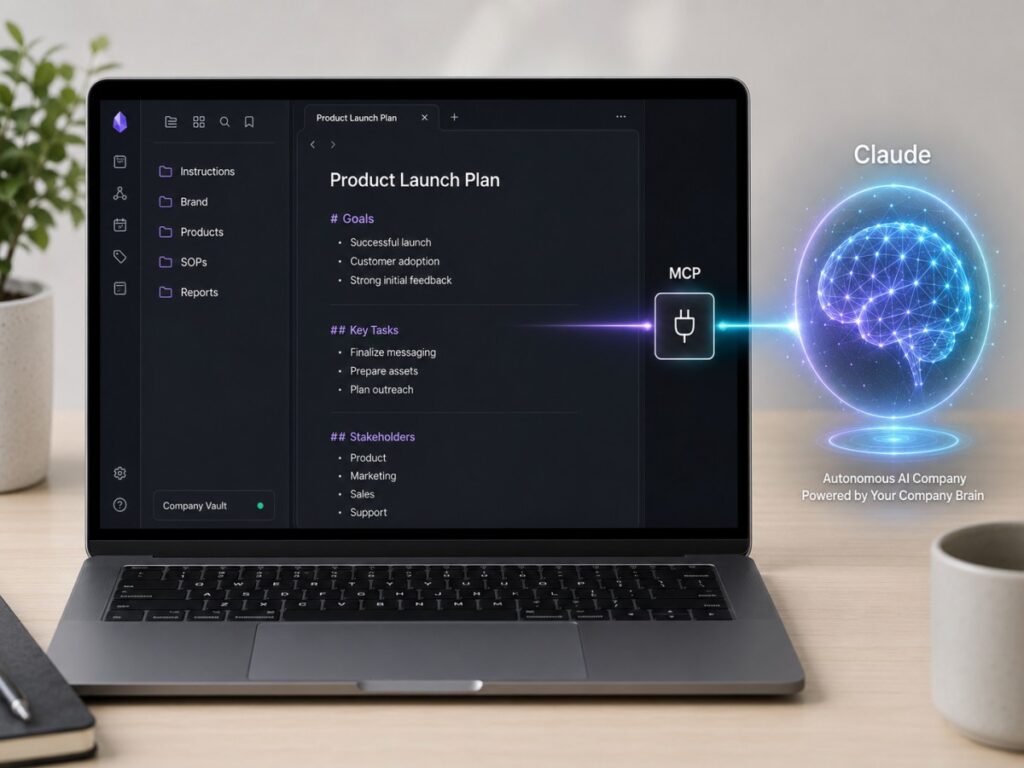
Layer 1 — The Brain: Obsidian + Claude
The brain is where your company’s knowledge lives, paired with an AI that can read and reason over it. The problem with a plain chatbot is that it forgets everything the moment a conversation ends. The brain of an autonomous AI company fixes that by giving your AI a permanent, written memory.
I use Obsidian for this. Obsidian is a free notes app that stores everything as plain Markdown text files on your own computer — no lock-in, works offline, and you own your data. It crossed 1.5 million users in early 2026 precisely because that plain-text format is perfect for AI: Claude can read and write those files natively. Pair the two through MCP and your vault becomes a living workspace the whole company shares. Here is the exact setup for the brain of your autonomous AI company.
Step 1 — Install Obsidian and create your vault
Download Obsidian for free from obsidian.md and install it. When it opens, create a new “vault” — this is just a folder on your computer. Name it something like CompanyBrain. If you place that folder inside a synced drive (Dropbox, iCloud, or OneDrive), it is automatically backed up and available on every device you own.
Step 2 — Build a simple folder structure
Structure matters, because a well-organized vault is what lets your agents find the right context. You do not need anything fancy. This layout works for almost any autonomous AI company:
CompanyBrain/
├── 00-Instructions.md      ← master rules every agent reads first
├── Brand/
│   └── voice-and-style.md   ← how we sound
├── Products/
│   └── offers-and-pricing.md
├── SOPs/                    ← step-by-step guides for each task
├── Agents/                  ← one note describing each agent's job
├── Knowledge/               ← FAQs, support answers, research
└── Reports/                 ← agents write their daily logs here
Step 3 — Write your master instruction file
The file 00-Instructions.md is the single most important thing you will create — it is what every agent reads first, so it defines who you are and how the company behaves. It can be as simple as this:
# Company Brain — Master Instructions

## About Us
- What we sell and who we serve
- Our brand voice: clear, friendly, no jargon

## Rules for Every Agent
- Always follow the brand voice above
- Cite a source for any statistic
- Flag anything risky for a human to review

## The Team
- Content Agent, Social Agent, Ads Agent,
  Sales Agent, Finance Agent, Support Agent
Do not type all of this out from memory. Open Claude and say, “Interview me to build my company brain,” answer its questions, then paste the result into the file. This is the self-improving “LLM Wiki” pattern that Andrej Karpathy popularized in 2026 — you write once, then refine as you go, and it is what makes an autonomous AI company improve over time.
Step 4 — Connect Claude to your vault with MCP
Now you give Claude access to the vault so it can read and write those notes in real time. The simplest path for beginners is the filesystem MCP server pointed at your vault folder. First install Node.js (free, from nodejs.org), which MCP needs to run. Then in Claude Desktop go to Settings → Developer → Edit Config and add this, replacing the path with your real vault folder:
{
  "mcpServers": {
    "company-brain": {
      "command": "npx",
      "args": [
        "-y",
        "@modelcontextprotocol/server-filesystem",
        "/path/to/CompanyBrain"
      ]
    }
  }
}
Restart Claude Desktop, then test the connection by asking, “List every file in my company brain.” If Claude reads your files back to you, it is working. If you want deeper Obsidian features later, community options like the mcp-obsidian server or the Obsidian Local REST API plugin connect the same way and give agents more control over your notes.
🚨 One security note: keep Obsidian and any MCP servers updated, and only run ones you trust. In April 2026, researchers disclosed a serious remote-code flaw in a widely used Obsidian MCP setup, so treat these connectors like any software that can touch your files — update promptly and review permissions.
That is your brain. From here on, every time you make a decision or learn something, jot it into the vault — Claude reads the newest version next session, so your autonomous AI company literally gets smarter every day.
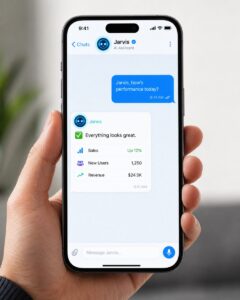
Layer 2 — Jarvis: Your AI Command Layer
Named after Iron Man’s assistant, Jarvis is the single voice you talk to in order to run your entire autonomous AI company. Instead of logging into five different tools, you send one message — usually through an app you already use like Telegram or WhatsApp — and Jarvis figures out which agent to call and reports back. “Jarvis, publish a post about summer travel.” “Jarvis, how did sales do yesterday?” It is the friendly front door to your autonomous AI company.
You have two ways to add Jarvis to your autonomous AI company. The no-code path is to assemble Jarvis inside your automation tool with a chat app and Claude — this is the most popular route for beginners and the one I will walk through. The ready-made path is to run an open-source assistant: projects like OpenClaw (a self-hosted assistant that talks to you through WhatsApp or Telegram and passed 250,000 GitHub stars in early 2026) and OpenJarvis (released by Stanford researchers in 2026) give you a working Jarvis you configure rather than build. Many people point these at the same Obsidian vault, so Jarvis shares your autonomous AI company’s memory.
Step 1 — Create a Telegram bot
Open Telegram and message @BotFather. Send /newbot, pick a name, and it hands you a bot token — a long string of characters. Copy it and keep it safe; this token is how your workflow talks to your chat.
Step 2 — Add a Telegram trigger in your automation tool
In n8n (which we set up in the next section), add a Telegram Trigger node and paste your bot token. Now the workflow fires every time you text the bot — that message becomes Jarvis’s instruction.
Step 3 — Give Jarvis its brain and personality
Add an AI Agent node powered by Claude. In its instructions, tell it who it is: “You are Jarvis, the assistant that runs my company. Read the brain for context and choose the right agent for each request.” Point it at your Obsidian vault so it always answers with your real business context — the shared memory of your autonomous AI company.
Step 4 — Give Jarvis tools to act
A Jarvis that only chats is not very useful. Connect the actions it should be able to take — trigger the Content agent, read a report from the vault, search the web, send an email. Each action is a tool node Jarvis can call on its own when your message calls for it.
Step 5 — Let Jarvis reply, then test it
Add a Telegram Send Message node so Jarvis answers you in the chat, and switch the workflow on. Text your bot “What can you do?” then try a real command like “Draft a post about summer travel and save it for review.” When it replies with the finished draft, your command layer is live.
[IMAGE 6: Ultra-realistic scene of a person speaking to a Jarvis-style AI on a futuristic holographic screen with a glowing voice waveform]
Step 6 — Talk to Jarvis With Your Voice (Like Iron Man)
Texting Jarvis is convenient, but actually speaking to it — and hearing it answer back in a calm, cinematic British voice — is the moment your autonomous AI company stops feeling like a workflow and starts feeling like a colleague. This is exactly what is behind the viral TikTok clips of creators holding full spoken conversations with their assistant, and the good news is that it bolts straight onto the Telegram workflow you just built. Telegram supports voice notes natively, so you do not need a new app — just two extra abilities: speech-to-text (so Jarvis can hear you) and text-to-speech (so Jarvis can speak).
Here is the voice loop, added as a branch inside the same n8n workflow:
- Detect the message type. Add a Switch (or IF) node right after the Telegram Trigger: typed text continues down your existing path, while a voice note takes the new voice branch.
- Download and transcribe. Telegram delivers your voice note as an audio file. Use a Telegram “Get File” step to download it, then pass it to a speech-to-text node — OpenAI’s Whisper node and ElevenLabs speech-to-text are the two most common choices in n8n — which turns your spoken words into plain text.
- Let the same Jarvis think. Feed the transcript into the exact same AI Agent node from Step 3. Jarvis does not care whether the instruction was typed or spoken — it reads the brain, picks the right agent, and produces its answer as usual.
- Turn the answer into speech. Send Jarvis’s text reply to a text-to-speech node. ElevenLabs is the most popular engine for this because its voices sound genuinely human, but any TTS API works the same way.
- Send the voice back. Finish the branch with a Telegram “Send Audio” node instead of Send Message. The reply lands in your chat as a playable voice note — you press play and Jarvis speaks.

Now for the fun part: the voice itself. In your TTS tool’s voice library, audition the deep, calm, refined British male voices — that composed, slightly formal butler tone is the “Jarvis feel” everyone recognizes from the films. Save your pick as the default voice ID in the text-to-speech node, and add one line to Jarvis’s personality prompt such as “Keep spoken replies short, composed, and politely witty,” so the wording matches the delivery.
🚨 One important caution before you copy what you see on TikTok: do not clone the actual movie voice from film audio. That voice belongs to a real actor and a copyrighted character, and cloning it without permission breaks the terms of every major voice platform and can create real legal problems if you publish the output. A licensed “Jarvis-style” British voice from the official voice library gives you the same effect with none of the risk.
Two expectations to set. First, this Telegram loop is asynchronous — you send a voice note, and a few seconds later Jarvis’s spoken reply arrives, because the workflow has to transcribe, think, and synthesize. It is not yet a live phone call. If you want true real-time conversation later, real-time voice agents (such as ElevenLabs’ conversational AI agents) can sit on top of the same n8n workflows via webhooks — a natural upgrade once the basic loop works. Second, watch the cost: speech tools charge per character or per minute of audio, and most offer a free tier that is plenty for testing, so prove the loop before paying for a plan.
Finally, make Jarvis proactive. Using a scheduled trigger (or Anthropic’s Claude Routines, which run recurring agent tasks), Jarvis can message you first — a short morning brief of what happened across your autonomous AI company overnight — so you manage by exception instead of checking dashboards. And yes, with the voice branch above, that morning brief can arrive as a voice note Jarvis reads to you while you make coffee.
Layer 3 — Orchestration: The n8n Nervous System
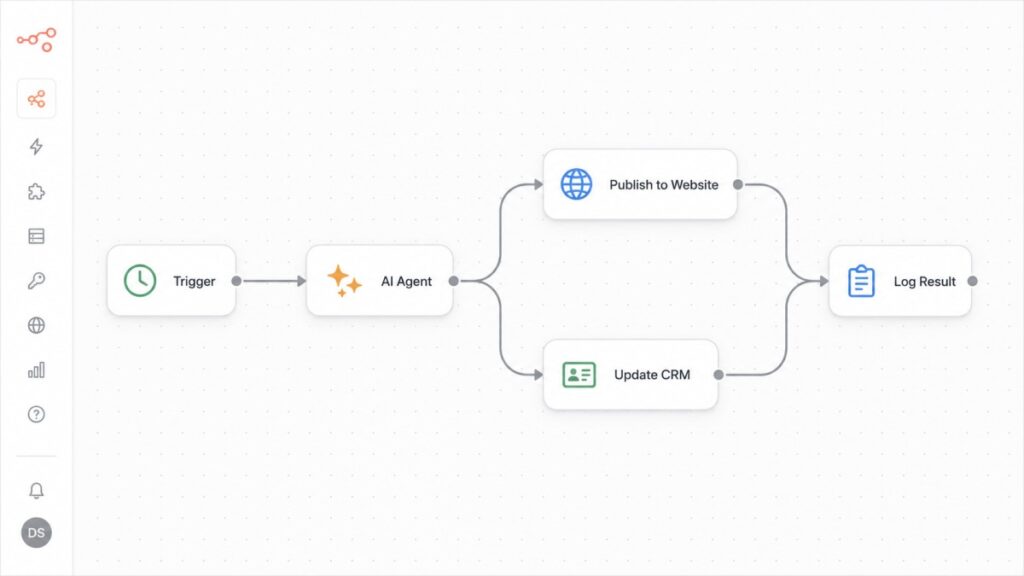
If the brain thinks and Jarvis listens, the orchestration layer of your autonomous AI company moves. This is the automation tool that runs the actual jobs of your autonomous AI company — it decides which agent fires, in what order, and what happens with the result. You do not need to be a programmer; you build these flows visually by dragging boxes and drawing arrows between them.
Three tools dominate in 2026. Pick based on your comfort level:
| Tool | Best for | Pricing model | AI / agent features |
|---|---|---|---|
| n8n | Control and low cost | Flat / self-hosted (pay per workflow run) | Deepest — n8n 2.0 (Jan 2026) added multi-agent orchestration, 70+ AI nodes, agent memory |
| Make | Visual power without code | Per operation | Maia AI assistant and AI agents |
| Zapier | The simplest start | Per task | Zapier Agents and AI Copilot; 8,000+ app connections |
My recommendation for an autonomous AI company on a budget is n8n — it charges per workflow run instead of per step, and its January 2026 release turned it into a genuine agent platform. Here is how to run your own copy.
Step 1 — Rent a small cloud server
A $5–20/month server (VPS) from providers like DigitalOcean, Hetzner, or AWS Lightsail is plenty for a whole autonomous AI company. Choose Ubuntu when you create it. If you would rather not touch a server at all, skip to Step 5.
Step 2 — Install Docker
Docker packages n8n so you never fight with dependencies. Connect to your server and install it — the official one-line installer from get.docker.com handles everything. This is a copy-paste step, not something you need to understand deeply.
Step 3 — Create a docker-compose file
In a new folder, create a file called docker-compose.yml and paste a configuration like this, replacing the placeholder values with your own:
services:
  n8n:
    image: n8nio/n8n
    restart: always
    ports:
      - "5678:5678"
    environment:
      - N8N_HOST=automation.yourdomain.com
      - N8N_PROTOCOL=https
      - WEBHOOK_URL=https://automation.yourdomain.com/
      - GENERIC_TIMEZONE=UTC
      - N8N_ENCRYPTION_KEY=your-random-32-char-key
    volumes:
      - n8n_data:/home/node/.n8n

volumes:
  n8n_data:
Step 4 — Start it and add HTTPS
Run docker compose up -d and n8n is live. Point a subdomain such as automation.yourdomain.com at your server’s IP address, and turn on HTTPS with a free proxy like Cloudflare or Caddy so the connection is secure.
Step 5 — Open n8n and connect Claude
Open n8n in your browser and create your admin account. Then go to Settings → Credentials → Add Credential → Anthropic and paste your Claude API key. From now on, every AI step in every workflow uses Claude as the reasoning engine of your autonomous AI company. Prefer no server at all? n8n Cloud, Make, and Zapier host everything for you — the ideas below are identical.
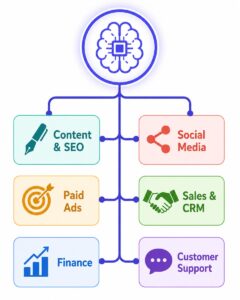
Layer 4 — The Workforce: Your AI Department Agents
This is the fun part: hiring the AI team for your autonomous AI company. Each “agent” is simply a saved workflow that uses Claude as its brain and a set of tools to do one department’s job. Start with one and add more as you gain confidence. Here are the core roles I would build first in any autonomous AI company, with the trigger and steps for each.
The Content and SEO Agent
Trigger: a daily schedule, or a message to Jarvis. What it does: finds a trending topic, checks what people search for, writes a full article in your brand voice, generates an image, publishes it to your website, and logs the result. It is the workhorse of any autonomous AI company because fresh content drives traffic. Pair it with a solid AI content strategy and modern generative engine optimization so your pages get picked up by both Google and AI answer engines.
The Social Media Agent
Trigger: a signal from the content agent when a post goes live. What it does: turns that one article into platform-ready posts — a square image for Instagram, a vertical clip for TikTok, a professional version for LinkedIn — each with its own caption and hashtags, then schedules them. One article becomes a week of social content for your autonomous AI company automatically.
The Paid Ads Agent
Trigger: a morning schedule. What it does: reads yesterday’s ad results and adjusts. If a campaign is profitable it can raise the budget; if it loses money for several days it pauses the campaign and alerts you. Modern ad platforms already handle targeting with AI, so this agent mostly manages the money and the guardrails.
The Sales and CRM Agent
Trigger: a new sale or sign-up. What it does: records the customer in your CRM, tags them correctly, and triggers the right follow-up message. It keeps your customer database clean and your leads warm without anyone doing manual data entry.
The Finance Agent
Trigger: a daily schedule. What it does: pulls your revenue and ad spend from your payment processor and ad accounts, and once a month writes a plain-English profit report — what came in, what went out, and what to do next. You wake up to a clear summary instead of a messy spreadsheet.
The Customer Support Agent
Trigger: an incoming email or chat message. What it does: reads the question, answers the routine 80–90% instantly using your support notes from the brain, and escalates anything sensitive — a refund dispute, a legal issue — to you with a clear summary. My deep dive on AI agents for ecommerce shows this exact pattern in a store setting.
The Operations Agents (Legal, HR, IT)
As you grow, add quieter agents: one that keeps your privacy policy and cookie notices current, one that onboards a new freelancer, and one that watches your servers and security. Start lean — every autonomous AI company should earn its complexity gradually, not on day one.
Worked Example: Building the Content Agent Step by Step
Theory is easy, but the first real agent in your autonomous AI company is where it clicks. Let me build the Content agent with you, node by node, because once this one works, every other agent in your autonomous AI company is a variation on the same shape.
- Trigger. Add a Schedule node set to, say, 6 AM daily — or let Jarvis start it on demand.
- Pick a topic. An AI Agent (Claude) node reads your content plan from the vault and chooses today’s topic and target keyword.
- Research. Add a web-search tool node so Claude gathers current facts and a couple of statistics to cite.
- Write. Claude writes the full article in your brand voice, following the rules in your instruction file — headings, an FAQ, and internal links.
- Create the image. An image-generation node produces a featured image from a prompt Claude wrote for it.
- Publish. A publish node sends the finished post to your website; most content platforms accept this through their API.
- Log it. A final node writes a one-line summary into your vault’s Reports folder, so you and Jarvis can see what shipped.
Drawn as a chain of connected nodes, the whole agent looks like this:
Schedule (6 AM)
   -> Read content plan (Obsidian vault)
   -> Claude: pick topic + keyword
   -> Web search: gather facts
   -> Claude: write the article
   -> Generate featured image
   -> Publish to website (API)
   -> Log summary to vault /Reports
Run it once, read the output critically, and tweak the instructions until the quality is genuinely good. Do not move on until this agent produces work you would be happy to publish — the standard you set here is the standard your whole autonomous AI company inherits.
Workflows vs. Agents: The One Rule That Saves You Money
Here is the single most valuable lesson I can pass on, straight from Anthropic’s own engineering guidance: start with the simplest thing that works, and only add “intelligence” when you truly need it. There is an important difference between a workflow and an agent, and confusing the two is how people burn cash.
A workflow follows fixed steps you define — do A, then B, then C. It is predictable, cheap, and easy to fix when it breaks. An agent is handed a goal and decides the steps itself. Agents are powerful for messy, unpredictable problems, but they cost more, run slower, and can wander off course. Anthropic’s advice is blunt: if you can write the steps down in advance, use a workflow, not an agent.
Inside your autonomous AI company, most jobs — “write this post,” “send this email,” “log this sale” — are workflows. Reserve true agents for genuinely open-ended tasks, like researching a new market. Anthropic groups the reliable building blocks into a few patterns worth knowing: chaining steps in sequence, routing a task to the right specialist, running steps in parallel, and having one “manager” hand work to “worker” agents. If you would rather build agents in code than in a no-code tool, the free Claude Agent SDK is the developer path, and my guide to AI coding agents covers the wider landscape.
The Tool Stack and What It Really Costs
You can start an autonomous AI company for far less than one part-time salary. Here is a realistic monthly budget for a lean autonomous AI company, using generic categories so you can pick whatever provider you prefer.
| What you need | Example category | Rough monthly cost |
|---|---|---|
| The brain | Obsidian (free) + Claude subscription and API usage | $20–150 |
| Jarvis + orchestration | Automation tool on a small VPS (n8n) | $5–20 |
| Messaging | Telegram or WhatsApp for Jarvis | Free |
| Voice (optional) | Speech-to-text + text-to-speech API for a spoken Jarvis | $0–25 |
| Content and SEO | Keyword and analytics tool | $0–100 |
| Email automation | Your email marketing platform | $15–50 |
| Image generation | AI image API | $10–30 |
| Total (excluding ad spend) | ≈ $75–375 / month |
Two honest notes. First, the AI usage bill grows with volume — more articles and more agent runs mean more tokens, so keep an eye on it. Second, note the June 2026 change: if you build agents with the Claude Agent SDK, that usage now draws from a separate monthly credit ($20–$200 depending on your plan) rather than your normal chat limits, so budget for it.
The Full 30-Day Roadmap to Your First Autonomous AI Company
Do not try to build everything at once — that is the fastest way to quit. Build one working piece, prove it, then add the next. Here is the day-by-day sequence I recommend for standing up your first autonomous AI company.
| Days | Focus | What you finish |
|---|---|---|
| Days 1–3 | The brain | Install Obsidian, create the vault and folders, write your master instruction file |
| Days 4–7 | Connect Claude | Install Node.js, connect Claude to the vault via MCP, and test reading and writing notes |
| Days 8–11 | Orchestration | Deploy n8n (or sign up for n8n Cloud), add your Claude API key, and run a test workflow |
| Days 12–16 | First agent | Build and refine the Content agent end to end until the quality is genuinely good |
| Days 17–20 | Jarvis | Create the Telegram bot, build the Jarvis command layer, add the voice branch, and connect it to your first agent |
| Days 21–25 | Expand | Add the Social and Support agents; connect your email tool and CRM |
| Days 26–30 | Money and safety | Add the Finance agent, set spending caps, turn on error alerts, and run everything together |
By day 30 you will have a small but real autonomous AI company: a brain that remembers, a Jarvis you can text or speak to, and agents handling content, social, support, and reporting. From there, every new agent is easier than the last, because the brain and the plumbing already exist.

Governance, Security, and Human Checkpoints
Now the part the flashy videos skip. Autonomy without guardrails is how an autonomous AI company fails. Gartner predicts that more than 40% of agentic AI projects will be cancelled by 2027, mostly because of unclear value and weak controls, and Deloitte found that only 1 in 5 organizations have a mature way to govern their agents. Do not be in the other four-fifths.
Three safeguards keep an autonomous AI company out of trouble. Set spending and action limits so no agent can move real money or make a big budget change without your sign-off. Add error alerts so that if any workflow fails, you get a message instantly — Jarvis is perfect for this — rather than discovering it a week later. And keep an audit trail — every agent should log what it did to the vault, so you can always see who did what.
Security matters just as much. Store every password and API key in your automation tool’s secure vault, never inside a workflow. Keep your MCP servers and plugins updated (remember the April 2026 Obsidian flaw), protect your website and admin panels, and rotate keys regularly. My guide to essential website security tips covers the basics every operator should have in place.
Finally, define the human-in-the-loop checkpoints for your autonomous AI company — the few moments you personally review:
- A 5-minute daily read of Jarvis’s summary of what happened.
- A weekly approval of any budget change above a threshold you set.
- A monthly review of the financial report and a quality check on a few published pieces.
Autonomous AI in Saudi Arabia and the MENA Region
For readers in the Kingdom and the wider region, the timing for an autonomous AI company could not be better. Saudi Arabia’s Vision 2030 has made AI and digital transformation national priorities, and the country is investing heavily in the infrastructure that autonomous systems depend on. The launch of HUMAIN, the Kingdom’s sovereign AI company backed by the Public Investment Fund, signals just how seriously the region is taking this shift.
What does that mean for you practically? Local cloud capacity and Arabic-capable models are growing fast, which makes it easier to run an autonomous AI company that serves Saudi and Gulf customers in their own language and time zone. If you operate here, build your brain bilingually from the start — brand voice, support answers, and content guidelines in both Arabic and English — so your agents and your Jarvis speak to customers naturally. My overview of the Saudi digital economy and my deep dive on HUMAIN give the fuller regional picture.
One more regional note: keep data residency and local regulations in mind when choosing where your servers and customer data live. Building an autonomous AI company that respects local rules from day one saves painful rework later.
FAQ: Autonomous AI Company
What exactly is an autonomous AI company?
It is a business whose routine operations — content, marketing, sales, support, and finance — are run by a coordinated team of AI agents that share one knowledge base, with a human overseeing strategy and quality. In practice it handles about 85–90% of daily work on its own.
Do I need to know how to code to build one?
No. No-code tools like Zapier, Make, and n8n let you build most agents by dragging boxes and connecting apps. Coding only becomes necessary if you want fully custom agents, in which case the Claude Agent SDK is the developer route.
What is Obsidian and why use it as the brain?
Obsidian is a free notes app that stores everything as plain Markdown files on your own device. It is ideal as the brain because Claude can read and write those files directly through MCP, giving your whole autonomous AI company one shared, permanent memory you fully control.
What is a “Jarvis” AI assistant?
Jarvis is the single conversational assistant you talk to — usually through Telegram or WhatsApp — to run your autonomous AI company. You send a plain message and Jarvis decides which agent to call and reports back. You can build one no-code with n8n, or run a ready-made open-source assistant like OpenClaw or OpenJarvis.
Can I control everything from Telegram or WhatsApp?
Yes. That is exactly what the Jarvis layer is for. Once it is wired up, you text commands like “publish a post about X” or “how did sales do yesterday?” and Jarvis triggers the right agent and answers you in the chat, from anywhere. You can even skip typing entirely: with the voice branch from Step 6, you send a voice note and Jarvis replies out loud in a cinematic, Iron Man-style spoken voice.
How much does an autonomous AI company cost to run?
A lean setup runs roughly $75–375 per month, excluding advertising, covering your AI model, a small server for orchestration, optional voice tools, and a few content and email tools. Obsidian and Telegram are free. Costs rise with volume, so start small and scale as the results justify it.
What is MCP and why does it matter?
The Model Context Protocol (MCP) is an open standard that lets AI models connect to your tools and data through one common interface — like USB-C for AI. It is what allows Claude to safely read your Obsidian vault, your CRM, and your website without a custom-built connection for every app.
Is it safe to let AI agents run my business?
It is safe when you add guardrails: spending limits, human approval for big decisions, error alerts, and an audit log of every action. Keep your MCP connectors updated too. The failures you read about almost always come from skipping these controls, not from the AI itself.
Which AI model should power the agents?
I use Claude for its strength in long, tool-using tasks, connected to the knowledge base through MCP. Any capable model can work; compare the options in my guide to the best AI models and agents before committing.
How long does it take to set up?
You can have a basic autonomous AI company — a brain, a Jarvis, and agents for content, social, and support — running in about 30 days by building one piece at a time rather than everything at once.
Conclusion: Start Small, Then Compound
An autonomous AI company is no longer a futuristic idea reserved for big tech. The models are ready, the connective standard (MCP) is mature, and the tools to wire it all together — Obsidian for the brain, a Jarvis you can text or talk to, n8n for the plumbing — are cheap and mostly no-code. What separates the people who succeed from the ones whose projects get cancelled is not budget — it is discipline: build the brain, add one agent, put in the guardrails, and only then expand.
My advice is to treat your Obsidian vault as the living heart of the business. Every time you learn something or make a decision, write it down there, and your agents instantly get smarter. Build methodically, keep a human on the important calls, and let your autonomous AI company compound. That is how a one-person operation starts to run like a full company — and how an autonomous AI company quietly becomes your biggest advantage.
Related reading:
- The Ultimate Guide to Autonomous AI Agents
- The Ultimate Claude AI Guide
- Best AI Models and Agents in 2026
- MCP Ecommerce: The Complete Technical Guide
- AI Content Strategy: Proven Playbook to Skyrocket Ranking
- HUMAIN Saudi Arabia: The Complete Guide
Sources: Anthropic — Building Effective Agents; Anthropic — Model Context Protocol; Anthropic — Claude Agent SDK docs; Obsidian; n8n; ElevenLabs. Market, adoption, and security figures attributed in-text to Gartner, McKinsey, Deloitte, and OX Security (2026).

Husain Alhaboubi is Director of Digital Channels at Mobily, where he leads platform optimization, AI-powered customer engagement, and UI/UX strategy. With 20+ years of experience spanning eCommerce, IT infrastructure, and digital marketing, he previously drove a 225% revenue increase and 69% organic traffic growth as eCommerce Senior Manager at flyadeal, and managed enterprise IT operations — including data centers, ERP systems, and network security — as Group IT Manager at IPD Group.
Husain holds a BS in Information Systems from the University of Texas at Arlington and is certified in Google Ads, Google Analytics, and Semrush SEO. He writes from hands-on experience across both sides of digital business: the strategic (eCommerce, SEO, AI, digital transformation) and the technical (server administration, cloud computing, web development, networking, and security) — with a particular focus on the Saudi market and Vision 2030. Read his full resume →