
Claude Code Project Structure: The Complete Guide to the .claude Folder in 2026
The difference between a Claude Code session that ships a feature in one clean pass and one that drops files in the wrong folders, ignores your conventions, and imports a library you do not use rarely comes down to the model. It comes down to the Claude Code project structure — the handful of files and folders that tell the agent how your repository actually works before it writes a single line. Get that structure right and Claude Code arrives already knowing your build commands, your architecture, and your rules. Get it wrong and it guesses.
Claude Code has become the fastest-growing developer tool of this cycle. Its run-rate revenue passed $2.5 billion by February 2026 (Reuters), and The Pragmatic Engineer’s February 2026 survey of roughly 15,000 developers rated it the most-loved AI coding tool, with 73% of engineering teams now using AI coding tools daily. Yet most teams adopt it as a terminal command and never touch the one thing that compounds its value over time: the .claude directory. In this guide I break down every part of the Claude Code project structure — CLAUDE.md, .mcp.json, settings.json, rules, skills, subagents, hooks, and memory — explaining what each file does, when it loads, and the exact configuration I would drop into a new repository.
Table of Contents
What the Claude Code Project Structure Actually Is
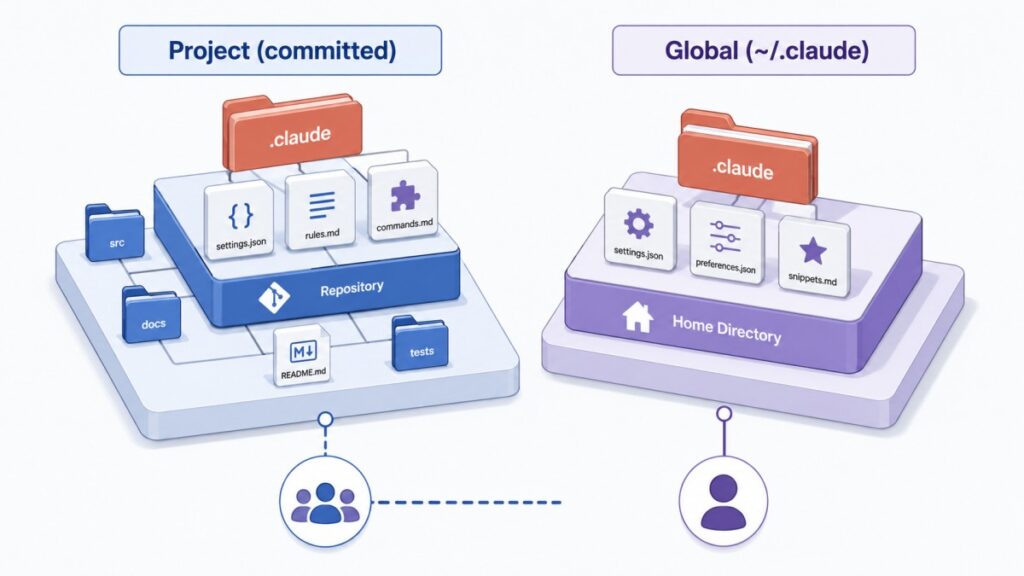
Before we open any single file, it helps to understand the model behind the whole system, because the Claude Code project structure is really two structures working together. Claude Code reads instructions, settings, skills, subagents, and memory from two places: your project directory and the ~/.claude directory in your home folder. Files committed to your repository are shared with your team; files in ~/.claude are personal configuration that applies across every project you touch.
That split maps onto three practical questions you should ask of every file you create. First, is it committed, gitignored, or purely local? Second, does it apply to this one project or to all of them? Third — and this is the distinction people miss most often — is the file guidance that Claude reads and tries to follow, or is it configuration that Claude Code enforces whether the model cooperates or not? CLAUDE.md and rules are guidance. Permissions and hooks in settings.json are enforced. Keeping that line clear is the single biggest lever you have over how predictable your sessions feel.
The good news: most developers only ever edit two files, CLAUDE.md and settings.json. Everything else — rules, skills, subagents, workflows — is optional, added as friction appears. Claude Code is one of the strongest examples of the shift toward agentic development I covered in my roundup of the leading AI coding agents, and its whole value proposition rests on reading your project before acting. If you prefer to see the entire tree laid out visually before you read the walkthrough, I built an interactive visual map of the .claude directory you can click through as a companion to this guide.
Root Files: CLAUDE.md, .mcp.json, and .worktreeinclude
Three files live at the root of your repository rather than inside the .claude/ folder: CLAUDE.md, .mcp.json, and .worktreeinclude. Placing them at the top level is intentional — they are the files you interact with most, and they need to be obvious to anyone cloning the repo.
CLAUDE.md: the File Loaded Every Session
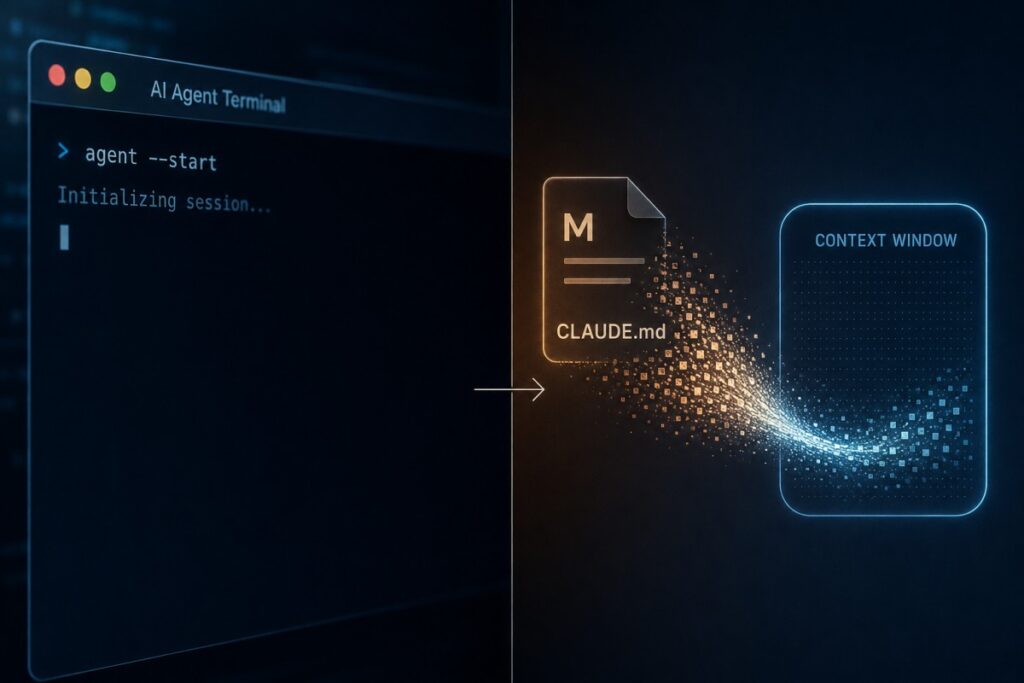
This is the single most important file in the entire Claude Code project structure. When you start a session, the first thing Claude Code does is read CLAUDE.md and load it straight into the system prompt, where it stays for the whole conversation. Whatever you write here, Claude treats as standing context: your build and test commands, your stack, your naming conventions, and any rules that should hold everywhere in the codebase.
A good starter file is short and human-readable. Here is a compact example for a TypeScript and React project:
# Project conventions

## Commands
- Build: `npm run build`
- Test: `npm test`
- Lint: `npm run lint`

## Stack
- TypeScript with strict mode
- React 19, functional components only

## Rules
- Named exports, never default exports
- Tests live next to source: `foo.ts` -> `foo.test.ts`
- All API routes return `{ data, error }` shape
A few practical notes from running this daily. Keep the file under about 200 lines — longer files still load in full, but adherence tends to drop as the file grows. If a piece of context only matters for certain tasks, move it into a rule or a skill so it loads only when needed rather than bloating every session. Claude Code also reads CLAUDE.md files hierarchically: when you work inside packages/api/, it loads both that folder’s CLAUDE.md and the root one, and the deeper file wins on conflicts. The file also works at .claude/CLAUDE.md if you prefer to keep the project root clean, and you can open and edit it mid-session with the /memory command.
Two related files are worth knowing. If you are starting in an unfamiliar codebase, the /init command scans your repository — package files, existing docs, configuration, and code structure — and generates a starter CLAUDE.md for you. And for private preferences you do not want to commit, create a CLAUDE.local.md at the project root and add it to .gitignore; it loads alongside CLAUDE.md but stays out of the shared repo.
.mcp.json: Team-Shared MCP Servers
The .mcp.json file configures Model Context Protocol (MCP) servers that give Claude access to external tools — databases, APIs, browsers, issue trackers, and more. This file holds the project-scoped servers your whole team uses, and like CLAUDE.md it lives at the project root, not inside .claude/. MCP is the same open protocol reshaping how AI agents plug into real systems, from developer tooling to commerce; I went deep on that shift in my guide to how MCP is transforming ecommerce if you want the broader context.
The critical detail is secrets handling: reference environment variables rather than pasting tokens into the file, so credentials never land in version control.
{
  "mcpServers": {
    "github": {
      "command": "npx",
      "args": ["-y", "@modelcontextprotocol/server-github"],
      "env": {
        "GITHUB_TOKEN": "${GITHUB_TOKEN}"
      }
    }
  }
}
The ${GITHUB_TOKEN} reference is read from your shell environment when Claude Code starts the server. Servers connect when the session begins, but tool schemas are deferred by default and load on demand through MCP tool search, which keeps a large server catalog from flooding the context window. If a server is only useful to you, do not put it here — run claude mcp add --scope user, which writes it to ~/.claude.json instead of the shared .mcp.json.
.worktreeinclude: Files to Copy Into Worktrees
The third root file is niche but useful. When Claude Code creates a git worktree — a fresh checkout used for isolated or parallel work — untracked files like .env are missing by default. .worktreeinclude lists gitignored files to copy from your main repository into each new worktree, using .gitignore pattern syntax. Only files that match a pattern and are also gitignored get copied, so tracked files are never duplicated. If you rely on parallel sessions or worktree-based isolation, this file quietly prevents a lot of “why is my environment empty” confusion.
Inside the .claude Directory: the Configuration Core
Everything project-specific that is not a root file lives inside .claude/. Most of it is committed so your team shares it; a couple of files, like settings.local.json, are gitignored automatically. This is where the Claude Code project structure moves from guidance the model reads to configuration the tool enforces.
settings.json: Permissions, Hooks, and Defaults
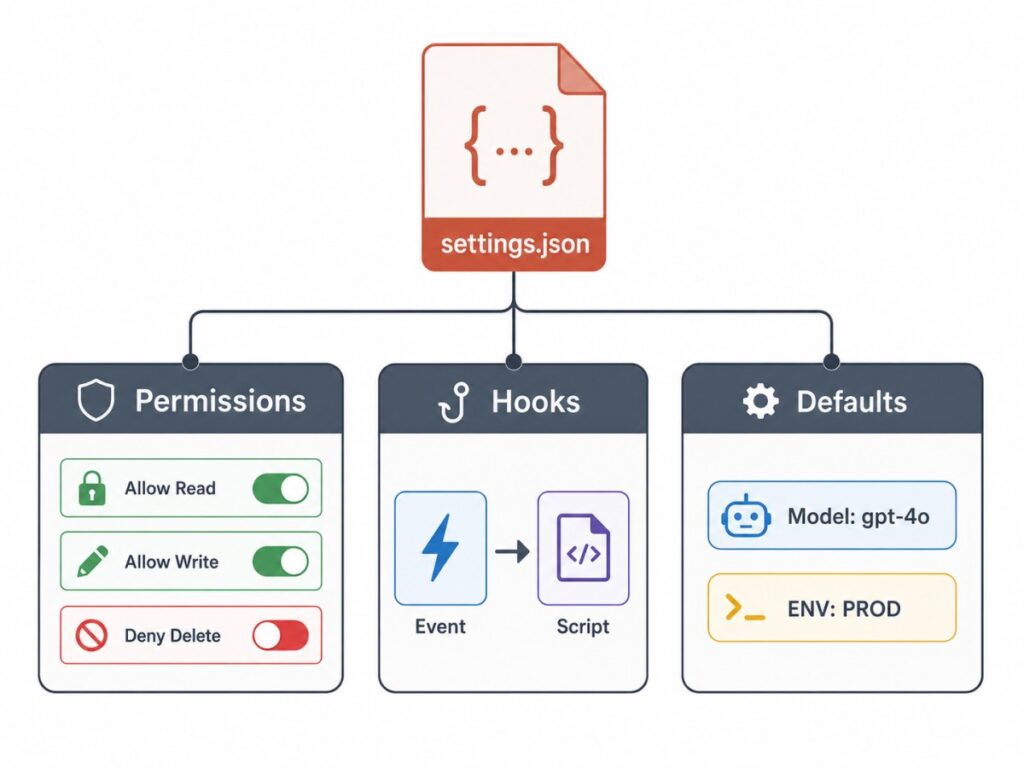
Unlike CLAUDE.md, which Claude reads as guidance, settings.json is applied directly by Claude Code. Permissions control which commands and tools Claude can use; hooks run your own scripts at specific points in a session, such as before a tool call or after a file edit. These are enforced whether or not the model would otherwise comply, which is exactly why they matter for safety and consistency. The file also holds your default model, session environment variables, a custom status line, and an output-style selection.
The example below allows npm test and npm run commands without prompting, blocks rm -rf, and runs Prettier on any file after Claude edits or writes it:
{
  "permissions": {
    "allow": [
      "Bash(npm test *)",
      "Bash(npm run *)"
    ],
    "deny": [
      "Bash(rm -rf *)"
    ]
  },
  "hooks": {
    "PostToolUse": [{
      "matcher": "Edit|Write",
      "hooks": [{
        "type": "command",
        "command": "jq -r '.tool_input.file_path' | xargs npx prettier --write"
      }]
    }]
  }
}
Bash permission patterns support wildcards, so Bash(npm test *) matches any command that starts with npm test. One subtlety worth internalizing: array settings such as permissions.allow combine across all scopes, while scalar settings such as model use the single most specific value. That behavior is different from how CLAUDE.md works, and it explains a lot of “why is this tool still allowed” surprises.
Right beside it sits settings.local.json. Same JSON schema, but it is your personal, gitignored override for this project — use it when you need different permissions or defaults than the team config, like allowing Bash(docker *) only on your machine. Claude Code adds this file to your global git ignore the first time it writes one, so your personal tweaks stay out of everyone else’s diffs.
rules/: Path-Scoped Instructions
The rules/ folder is how you split project instructions into topic files that can load conditionally. A rule without paths: frontmatter loads at session start, exactly like CLAUDE.md. A rule with paths: loads only when Claude reads a file matching its globs. This is the cleanest way I have found to keep instructions relevant: your test conventions only enter context when Claude touches a test file.
---
paths:
  - "**/*.test.ts"
  - "**/*.test.tsx"
---

# Testing Rules

- Use descriptive test names: "should [expected] when [condition]"
- Mock external dependencies, not internal modules
- Clean up side effects in afterEach
Subdirectories work automatically — .claude/rules/frontend/react.md is discovered without any registration. Like CLAUDE.md, rules are guidance rather than enforced configuration; for behavior that must happen every time, reach for hooks or permissions instead. My rule of thumb: when a single CLAUDE.md starts pushing past 200 lines, that is the signal to start breaking concerns out into rules/.
Extending Claude Code: Skills, Commands, and Subagents
This is where the Claude Code project structure goes from configuring the agent to genuinely extending it. Three directories do the heavy lifting — skills/, commands/, and agents/ — plus a newer workflows/ folder for orchestration.

skills/: Reusable Prompts You and Claude Can Call
A skill is a folder containing a SKILL.md file plus any supporting files it needs. By default both you and Claude can invoke a skill: you type /skill-name, or Claude matches the current task to the skill’s description and invokes it automatically. Frontmatter controls that behavior — set disable-model-invocation: true for user-only workflows like /deploy, or user-invocable: false to hide a skill from the / menu while still letting Claude use it.
---
description: Reviews code changes for security vulnerabilities, authentication gaps, and injection risks
disable-model-invocation: true
argument-hint:
---

## Diff to review

!`git diff $ARGUMENTS`

Audit the changes above for:

1. Injection vulnerabilities (SQL, XSS, command)
2. Authentication and authorization gaps
3. Hardcoded secrets or credentials

Use checklist.md in this skill directory for the full review checklist.
Report findings with severity ratings and remediation steps.
Two things make skills powerful. First, they accept arguments: /deploy staging passes “staging” as $ARGUMENTS, and you can use $0, $1, and so on for positional access. Second, they bundle supporting files — reference docs, templates, even scripts — right next to SKILL.md, and Claude can read them on demand. The description frontmatter is what determines when Claude auto-invokes the skill, so write it with the keywords a developer would actually mention.
commands/: Single-File Prompts (the Legacy Path)
Here is a change worth flagging clearly, because it trips people up: 🚨 commands and skills are now the same mechanism. A file at commands/deploy.md creates /deploy exactly the way a skill at skills/deploy/SKILL.md does, and both can be auto-invoked by Claude. The only real difference is that a skill is a directory that can bundle extra files, while a command is a single markdown file. Commands still work and remain fully supported, but for anything new, Anthropic recommends skills — same /name invocation, plus room to grow. If a skill and a command share a name, the skill takes precedence.
agents/: Subagents With Their Own Context
Each markdown file in agents/ defines a subagent: its own system prompt, its own tool access, and optionally its own model. The key property is isolation — a subagent runs in a fresh context window, separate from your main session, which keeps the primary conversation clean and is ideal for parallel or well-bounded tasks. This is the same pattern behind the broader move toward autonomous AI agents that plan and execute without constant human input.
---
name: code-reviewer
description: Reviews code for correctness, security, and maintainability
tools: Read, Grep, Glob
---

You are a senior code reviewer. Review for:

1. Correctness: logic errors, edge cases, null handling
2. Security: injection, auth bypass, data exposure
3. Maintainability: naming, complexity, duplication

Every finding must include a concrete fix.
The description frontmatter tells Claude when to delegate to the subagent automatically, and tools: restricts what it can do — here, read-only access so the reviewer can inspect code but never edit it. You can also delegate manually by typing @ and choosing an agent from the autocomplete. Rounding out this group is workflows/: dynamic .js scripts that orchestrate many subagents at once. You do not hand-write these — Claude authors them and you save a run from the /workflows interface, after which each file becomes its own /name command.
How Claude Code Remembers: Memory and Personalization
The parts of the Claude Code project structure covered so far are files you author. Memory is different: Claude Code maintains it for you. Auto memory lets Claude accumulate knowledge across sessions without you writing anything — it saves notes as it works, such as build commands, debugging insights, and architecture observations, keyed to each project by repository path. Those notes live in ~/.claude/projects/<project>/memory/, indexed by a MEMORY.md file whose first 200 lines (capped at 25KB) load at the start of every session. It is on by default, you can toggle it with /memory or the autoMemoryEnabled setting, and the files are plain markdown you can edit or delete anytime.
Do not confuse auto memory with CLAUDE.md. CLAUDE.md is context you write and control; auto memory is context Claude writes and maintains. They complement each other. Subagents get their own separate memory, too: give a subagent memory: project frontmatter and it reads and writes its own MEMORY.md under .claude/agent-memory/, distinct from your main session memory.
Everything also has a personal, global counterpart under ~/.claude/. A global ~/.claude/CLAUDE.md loads into every session across all projects — the right home for your response-style preferences and commit-message format. There is a global settings.json for defaults you want everywhere, plus personal skills/, rules/, agents/, and commands/, and cosmetic touches like keybindings.json and custom themes/.
Installed plugins live under ~/.claude/plugins, managed by claude plugin commands, which let you install shared marketplaces of skills, subagents, and commands instead of authoring every extension by hand. When a global CLAUDE.md and a project CLAUDE.md disagree, the project-level instruction wins. Claude Code is only one surface of the wider platform, and if you want the full picture of what the assistant can do beyond the terminal, I keep a living reference in my complete Claude AI guide.
Settings Precedence: Who Wins When Configs Conflict
Once you spread configuration across project and global scopes, conflicts are inevitable, and knowing the precedence order saves hours of debugging. From highest priority to lowest, this is who wins:
| Priority | Source | Scope |
|---|---|---|
| 1 (highest) | Managed settings (managed-settings.json) | Enterprise-enforced, cannot override |
| 2 | CLI flags (--permission-mode, --settings) | Current session only |
| 3 | .claude/settings.local.json | Project, personal |
| 4 | .claude/settings.json | Project, team-shared |
| 5 (lowest) | ~/.claude/settings.json | Global, personal |
Two caveats sit on top of that ladder. Some environment variables take precedence over their equivalent setting, but this varies per variable, so check the environment-variables reference rather than assuming. And the merge behavior differs by setting type: array settings like permissions.allow combine across every scope, while scalar settings like model take the single most specific value. This is also where settings.json and CLAUDE.md diverge conceptually — settings are merged key by key according to precedence, whereas a global and a project CLAUDE.md are both loaded into context together rather than merged.
A Recommended Baseline Claude Code Project Structure
Pulling it together, here is a baseline Claude Code project structure I would drop into a non-trivial repository. You will not need every folder on day one — treat it as a menu, add pieces as friction appears, and commit the ones your team should share.
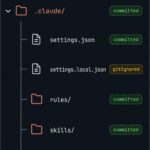
my-project/
├── CLAUDE.md                 # Loaded every session (project context)
├── CLAUDE.local.md           # Your private notes (gitignored, manual)
├── .mcp.json                 # Team-shared MCP servers
├── .worktreeinclude          # Gitignored files to copy into worktrees
└── .claude/
    ├── settings.json         # Permissions, hooks, env, model (committed)
    ├── settings.local.json   # Personal overrides (gitignored)
    ├── rules/                # Path-scoped instructions
    │   ├── testing.md
    │   └── api-design.md
    ├── skills/               # Reusable /commands you and Claude can call
    │   └── security-review/
    │       ├── SKILL.md
    │       └── checklist.md
    ├── commands/             # Single-file prompts (legacy; prefer skills)
    │   └── fix-issue.md
    ├── agents/               # Subagents with their own context window
    │   └── code-reviewer.md
    └── workflows/            # Dynamic multi-subagent scripts
        └── release.js
What to commit and what to keep private breaks down cleanly:
| File or folder | Location | Commit to Git? | Purpose |
|---|---|---|---|
CLAUDE.md | Project root or .claude/ | Yes | Session context and conventions |
CLAUDE.local.md | Project root | No | Your private per-project notes |
.mcp.json | Project root | Yes | Team-shared MCP servers |
settings.json | .claude/ | Yes | Permissions, hooks, defaults |
settings.local.json | .claude/ | No | Personal setting overrides |
rules/, skills/, agents/ | .claude/ | Yes | Instructions and extensions |
~/.claude/ | Home directory | Never | Personal config, all projects |
For a brand-new repo, the fastest path is: run /init to generate a first CLAUDE.md, add a settings.json with the permissions your team is comfortable auto-approving, and then grow rules/, skills/, and agents/ as real pain points show up. Do not try to author everything at once.
One security note that belongs in every setup conversation: 🚨 Claude Code writes session transcripts and prompt history to ~/.claude in plain text, and anything a tool reads — including a .env file or a printed credential — can land in those transcripts. Reduce exposure by lowering the cleanupPeriodDays setting (transcripts are deleted after 30 days by default), using permission rules to deny reads of credential files, and running claude project purge to wipe a project’s stored state when you are done with it. Preview exactly what would be removed before you commit to it:
claude project purge ~/work/my-repo --dry-run
Common Claude Code Project Structure Mistakes to Avoid
Most of the friction I see with the Claude Code project structure is not from missing files — it is from a handful of avoidable mistakes. Here are the ones that cost the most time, drawn from setting this up across real repositories.
- Overloading
CLAUDE.md. A 400-line instruction file still loads in full, but adherence drops as it grows. Split concerns into path-scopedrules/once it passes roughly 200 lines instead of stuffing everything into one file. - Treating guidance as enforcement. Writing “never run destructive commands” in
CLAUDE.mdis a suggestion the model may or may not honor. If a rule must always hold, put it insettings.jsonpermissions or a hook — that is enforced regardless of what the model decides. - Hardcoding secrets. Pasting a token directly into
.mcp.jsonorsettings.jsoncommits it to git and writes it into plaintext transcripts. Always reference an environment variable, and deny reads of credential files with a permission rule. - Misplacing
.mcp.json. It belongs at the project root, not inside.claude/. Putting it in the wrong place is a quiet reason a team’s MCP servers silently fail to load. - Ignoring settings precedence. Being surprised that a managed enterprise setting, a CLI flag, or your own
settings.local.jsonoverrode the project config almost always traces back to not knowing the precedence order. - Writing vague skill descriptions. Claude auto-invokes skills by semantically matching the
descriptionfrontmatter. A description without the keywords a developer would actually mention means the skill never fires on its own. - Committing personal preferences. Your editor keybindings, theme, and machine-specific permissions belong in
~/.claude/or gitignoredsettings.local.json— not committed into the shared repo where they clutter everyone else’s setup.
FAQ: Claude Code Project Structure
Where does Claude Code look for the CLAUDE.md file?
Claude Code reads CLAUDE.md from your working directory up to the repository root, loading every file it finds along the way, with deeper files taking priority on conflicts. It also accepts CLAUDE.md at .claude/CLAUDE.md if you prefer a clean project root, and it loads your global ~/.claude/CLAUDE.md in every session on top of the project files.
Should I commit the .claude folder to Git?
Yes, commit most of it. The project .claude/ folder is designed to be shared so your whole team gets the same permissions, skills, rules, and subagents. The exceptions are personal files like settings.local.json and CLAUDE.local.md, which are gitignored. Your global ~/.claude/ directory is never part of any repository.
What is the difference between Claude Code skills and slash commands?
They are now the same underlying mechanism, both invoked with /name and both auto-invocable by Claude. The practical difference is packaging: a skill is a directory built around SKILL.md that can bundle reference docs, templates, and scripts, while a command is a single markdown file. Anthropic recommends skills for new workflows; existing commands still work.
Where does the .mcp.json file go — inside .claude or at the project root?
At the project root, alongside CLAUDE.md, not inside .claude/. It holds the team-shared MCP servers for the project. Personal MCP servers you do not want to share belong in ~/.claude.json instead, which you can populate with claude mcp add --scope user.
How is CLAUDE.md different from auto memory in Claude Code?
CLAUDE.md is context you write and control; auto memory is context Claude writes and maintains for you across sessions. CLAUDE.md lives in your repo and loads in full at session start. Auto memory lives under ~/.claude/projects/, is generated automatically as Claude works, and is not committed. Use the first for deliberate conventions and the second as a self-updating notebook.
What is the difference between rules and CLAUDE.md?
Both are guidance the model reads, but rules can be scoped. A rule without paths: frontmatter behaves like CLAUDE.md and loads at session start. A rule with paths: globs loads only when Claude reads a matching file, which keeps context lean. The common practice is to start with CLAUDE.md and split concerns into rules/ once it grows past roughly 200 lines.
How do I keep secrets and .env files out of the Claude Code project structure?
Reference environment variables in .mcp.json rather than pasting tokens, keep personal overrides in gitignored settings.local.json, and use permission rules to deny reads of credential files. Remember that transcripts in ~/.claude are plaintext, so lower cleanupPeriodDays or set CLAUDE_CODE_SKIP_PROMPT_HISTORY if you handle sensitive material, and run claude project purge to clear stored state.
Does the Claude Code project structure work the same on Windows?
Yes. The only difference is the home path: ~/.claude resolves to %USERPROFILE%\.claude on Windows. If you set the CLAUDE_CONFIG_DIR environment variable, every ~/.claude path instead lives under that directory. Everything else — the project .claude/ folder and its contents — is identical across platforms.
Conclusion: Build It Once, Benefit Every Session
A well-designed Claude Code project structure is a compounding asset. Every convention you add to CLAUDE.md, every permission you lock down in settings.json, every skill and subagent you commit stacks on the last, so the agent gets more effective the more you use it rather than starting from zero each session. You do not need all of it to begin — start with CLAUDE.md and settings.json, then reach for rules, skills, subagents, and memory as your workflow demands them.
The payoff is real: instead of re-explaining your stack, your patterns, and your constraints every time, Claude Code arrives already knowing them, and your conversations start at a higher level. Set the structure up once, commit it, and let it work for the whole team on every future session.
Related reading:
- Top AI Coding Agents: The Complete Comparison Guide
- The Ultimate Claude AI Guide: Every Feature, Tip, and Prompt You Need
- The Ultimate Guide to Autonomous AI Agents
- MCP Ecommerce: The Complete Technical Guide for Engineers, CTOs, and Architects
Sources: Anthropic Claude Code documentation — Explore the .claude directory, Settings, MCP, Subagents, and Hooks, plus the Claude Code overview (2026); Reuters — Anthropic revenue reporting (February 2026); The Pragmatic Engineer — 2026 AI Coding Tools Survey (February 2026).

Husain Alhaboubi is Director of Digital Channels at Mobily, where he leads platform optimization, AI-powered customer engagement, and UI/UX strategy. With 20+ years of experience spanning eCommerce, IT infrastructure, and digital marketing, he previously drove a 225% revenue increase and 69% organic traffic growth as eCommerce Senior Manager at flyadeal, and managed enterprise IT operations — including data centers, ERP systems, and network security — as Group IT Manager at IPD Group.
Husain holds a BS in Information Systems from the University of Texas at Arlington and is certified in Google Ads, Google Analytics, and Semrush SEO. He writes from hands-on experience across both sides of digital business: the strategic (eCommerce, SEO, AI, digital transformation) and the technical (server administration, cloud computing, web development, networking, and security) — with a particular focus on the Saudi market and Vision 2030. Read his full resume →