
GA4 Ecommerce Tracking Saudi Arabia
Saudi Arabia’s e-commerce market reached $27.96 billion in 2025 and is projected to grow at nearly 12% annually to $54.87 billion by 2031, according to Mordor Intelligence (January 2026). With 99% internet penetration, 78% 5G coverage, and smartphones driving 78% of online revenue, the Kingdom has one of the most digitally connected consumer bases in the world. Yet many Saudi e-commerce businesses struggle to measure what is actually driving their growth.
GA4 ecommerce tracking Saudi Arabia is no longer optional for brands that want sustainable, data-driven growth. Many Saudi e-commerce leaders feel frustrated, confused, and even mistrustful of their analytics. If you have ever stared at GA4 dashboards wondering why numbers do not match your backend, you are not alone. I have worked with businesses across Saudi Arabia that faced the same challenge, and the problem is rarely lack of effort. It is almost always lack of clarity, structure, and context.
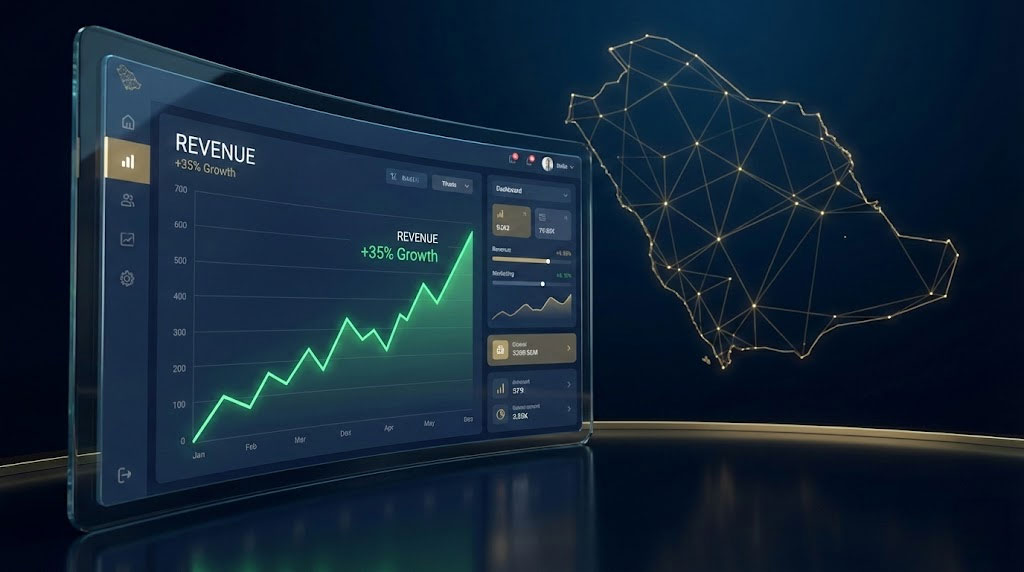
Table of Contents
Why Saudi E-Commerce Teams Struggle with GA4 Tracking

GA4 is powerful, but power without understanding creates pain. Saudi e-commerce businesses often migrate from Universal Analytics expecting familiar reports, only to find a completely different event-based model. Suddenly, sessions feel abstract, conversions look inconsistent, and revenue numbers raise more questions than answers. This confusion grows when multiple platforms like payment gateways, mobile apps, and marketplaces are involved.
The Saudi market adds another layer of complexity. Local payment methods such as Mada, STC Pay, Apple Pay, and Buy Now Pay Later solutions require precise event handling. Credit and debit cards maintain a 42.62% market share in Saudi e-commerce as of 2025, while digital wallets are growing at nearly 14.71% annually (Mordor Intelligence, January 2026). When these interactions are not tracked correctly, GA4 underreports conversions or attributes them incorrectly. This creates doubt in marketing performance and weakens trust between data teams and leadership.
Adding to the challenge, Google renamed “conversions” to “key events” in GA4 in March 2024. This terminology shift confuses teams who are still adjusting to the platform. Understanding GA4 ecommerce tracking Saudi Arabia now requires fluency in this updated vocabulary, and I will cover exactly how key events work later in this guide.
A Familiar Scenario: When Data Stops Making Sense
Imagine a fast-growing Saudi online store running Google Ads, social campaigns, and influencer partnerships. Orders are coming in, revenue is healthy, yet GA4 shows a lower conversion rate than expected. The finance team reports higher sales than GA4. Marketing is blamed, campaigns are paused, and growth slows down. I have seen this exact situation play out repeatedly.
The root cause is rarely traffic quality. It is usually incomplete GA4 event implementation, missing purchase parameters, or broken Google Tag Manager logic. Without proper tracking, even the best campaigns look ineffective. This disconnect can cost businesses millions in lost opportunities and misinformed decisions. If you are building a broader AI-driven content strategy, having trustworthy analytics data is the foundation everything else rests on.
What Life Looks Like After Mastering GA4 Ecommerce Tracking Saudi Arabia
Now picture a different reality. Every purchase is tracked accurately. Revenue in GA4 matches your backend within an acceptable margin. Campaign performance is clear, reliable, and actionable. Stakeholders trust the data, and decisions are made with confidence instead of guesswork.
When you master GA4 ecommerce tracking Saudi Arabia, you gain visibility across the entire customer journey. From product views to checkout behavior, payment success, and post-purchase engagement, every step becomes measurable. This clarity unlocks smarter budget allocation, stronger optimization, and predictable growth. Understanding how digital consumer behavior in the Middle East drives purchasing decisions makes this data even more valuable.
GA4 Ecommerce Tracking Saudi Arabia: Step-by-Step Implementation
Understanding GA4’s Event-Based Model and Key Events

GA4 is built entirely around events. There are no traditional goals. Every meaningful interaction must be defined, structured, and sent as an event. For e-commerce, this includes view_item, add_to_cart, begin_checkout, and purchase. Each event must carry specific parameters such as currency, value, and item details.
A critical update to understand: in March 2024, Google officially renamed “conversions” to “key events” within GA4. The functionality has not changed, but the terminology has. What you previously marked as a “conversion” is now a “key event” in the GA4 interface. The term “conversion” now only applies within Google Ads when a key event is imported for campaign optimization. This distinction matters because GA4 reports, Explorations, and Looker Studio all use “key events” as the metric, while the Advertising section of GA4 shows “conversions” with data-driven attribution.
This structure allows more flexibility, but it also requires precision. Missing or inconsistent parameters break reports. For Saudi stores, currency handling in SAR must be consistent across all events to avoid revenue discrepancies in your Google Analytics 4 conversion events setup.
Enhanced Ecommerce Events You Should Track
Beyond the basic purchase event, comprehensive GA4 ecommerce tracking Saudi Arabia should include the full customer journey. Here are the essential events in order of the funnel:
| Event Name | When to Fire | Required Parameters | Saudi-Specific Notes |
|---|---|---|---|
| view_item_list | Category or search results page loads | item_list_id, item_list_name, items[] | Track Arabic and English category names separately |
| select_item | User clicks on a product | item_list_id, items[] | Important for understanding navigation patterns |
| view_item | Product detail page loads | currency, value, items[] | Always use SAR for currency consistency |
| add_to_cart | Product added to cart | currency, value, items[] | Track both website and app cart additions |
| add_to_wishlist | Product saved for later | currency, value, items[] | Popular behavior during Ramadan sale seasons |
| begin_checkout | Checkout process initiated | currency, value, items[] | Critical for measuring cart abandonment |
| add_shipping_info | Shipping method selected | currency, value, shipping_tier, items[] | Track same-day vs standard delivery preferences |
| add_payment_info | Payment method selected | currency, value, payment_type, items[] | Essential for Mada, STC Pay, and BNPL analysis |
| purchase | Order confirmed | transaction_id, value, currency, items[] | Fire only after payment gateway confirmation |
Each event should include the items array with item_id, item_name, price, and quantity at minimum. For Saudi stores serving both Arabic and English audiences, consider tracking item names in a consistent language for cleaner reporting. With the Mada national payment network processing $52.6 billion in e-commerce sales in 2024 (a 25.8% increase from 2023), getting payment tracking right is more important than ever.
Google Analytics 4 Conversion Events Setup
Not every event should be a key event. In GA4, key events (formerly called conversions) represent high-value actions. For most Saudi e-commerce businesses, purchase is the primary key event, while begin_checkout and add_payment_info support funnel analysis.
After sending events to GA4, you must explicitly mark the correct ones as key events inside the GA4 interface. Navigate to Admin > Events, find your event, and toggle the “Mark as key event” switch. This step is often overlooked, leading teams to assume tracking is broken when it is simply incomplete. Note that the purchase event is automatically marked as a key event by default.
For Google Analytics 4 conversion events setup specifically tailored to Saudi e-commerce, I recommend marking these events as key events: purchase (primary), begin_checkout (micro-conversion for funnel optimization), and generate_lead if you collect inquiries for high-value items. If you are running Google Ads, you will also need to import these key events into Google Ads as “conversions” for campaign optimization and Smart Bidding.
How to Track Purchase Events GA4 GTM
Google Tag Manager remains the most reliable way to track purchase events GA4 GTM. The purchase event should fire only after a successful transaction confirmation page or callback. It must include transaction_id, value, currency, and items.
dataLayer.push({
  event: "purchase",
  ecommerce: {
    transaction_id: "T12345",
    value: 299.00,
    currency: "SAR",
    tax: 44.85,
    shipping: 15.00,
    coupon: "SUMMER10",
    items: [{
      item_id: "SKU123",
      item_name: "Product Name",
      item_brand: "Brand Name",
      item_category: "Electronics",
      item_category2: "Smartphones",
      price: 299.00,
      quantity: 1
    }]
  }
});
In GTM, create a GA4 Event tag with the following configuration:
Tag Type: Google Analytics: GA4 Event
Google Tag: Your Google Tag (formerly GA4 Configuration tag)
Event Name: purchase
Event Parameters: Map each ecommerce parameter from your dataLayer using built-in ecommerce variables or custom Data Layer Variables.
A key 2025 GTM update: GA4 Configuration tags have been renamed to “Google Tags” and now include expanded capabilities such as settings variables for reusing common parameters across multiple event tags. This simplifies your GA4 ecommerce tracking Saudi Arabia setup significantly.
Proper triggers and variables in GTM ensure that the event fires once and only once. This is critical to prevent duplicate key events, a common issue in Saudi stores with redirect-based payment gateways.
Track Purchase Events GA4 GTM for Saudi Payment Gateways

Saudi payment gateways often redirect users off-site before returning them to a confirmation page. This makes tracking fragile if not handled correctly. You must rely on server-side confirmations or secure thank-you pages rather than button clicks.
For Mada and local card payments through gateways like HyperPay, Moyasar, or PayTabs, ensure your confirmation page only renders the dataLayer.push after receiving a successful payment callback. Never fire the purchase event on page load without verification. With electronic payments accounting for 79% of all retail transactions in Saudi Arabia in 2024 (exceeding the government’s 70% target set for 2025), getting this right impacts the vast majority of your transactions.
BNPL providers like Tamara and Tabby add additional complexity because the purchase may be approved asynchronously. For deeper understanding of this ecosystem, you can explore Buy Now Pay Later in Saudi Arabia, which explains how payment behavior impacts conversion measurement.
Validating Your Implementation with GA4 DebugView

Never trust your implementation without verification. GA4 DebugView allows you to monitor incoming events from a specific browser or device in real-time, showing you exactly what data your website is sending before it appears in standard reports.
How to enable DebugView:
Option 1 – Chrome Extension: Install the Google Analytics Debugger extension and enable it while testing. This automatically adds the debug_mode parameter to all GA4 hits from your browser.
Option 2 – GTM Preview Mode: When you activate GTM Preview and Debug mode, it automatically enables DebugView for your session. This is the recommended approach when testing tag configurations, and the updated Tag Assistant Live now supports real-time debugging across multiple domains and browsers.
Option 3 – Hardcoded Parameter: Add debug_mode: true to your Google Tag for testing environments only. Never publish this to production.
In DebugView (Admin > DebugView), you will see a timeline of events as they fire. Click on any event to inspect its parameters. For purchase events, verify that transaction_id, value, currency, and items are all present and correctly formatted.
Testing best practices: Always use incognito mode to avoid cached sessions. Test edge cases like abandoned carts, failed payments, and discount code applications. Document what parameters you expect versus what you receive. Standard GA4 reports can take 24-48 hours to process data, so DebugView is essential for catching issues before you lose two days of data.
Why Is My GA4 Conversion Rate Different from My Store Backend?
This is one of the most common questions I hear. GA4 and backend systems measure different things. Backend systems record completed orders. GA4 records client-side or server-side events that depend on correct firing conditions.
Common causes of discrepancies include:
Ad blockers: Ad blockers affect roughly 25% of web traffic globally, which can cause significant gaps in your analytics. This percentage varies by audience demographics in Saudi Arabia.
Failed event triggers: JavaScript errors, slow page loads, or users navigating away before the dataLayer push completes.
Missing or incorrect parameters: Events without transaction_id may be deduplicated incorrectly. Currency mismatches between SAR and USD cause revenue calculation errors.
Duplicate transaction IDs: If users refresh the confirmation page, the purchase event may fire multiple times. GA4 deduplicates by transaction_id, but only if it is unique and consistent.
Cross-domain tracking issues: If your checkout redirects to a payment gateway on a different domain without proper cross-domain tracking, the session breaks. This is especially common with Saudi payment gateways like HyperPay and Moyasar.
A small discrepancy (5-10%) is normal and expected. Large gaps (20%+) indicate implementation issues that must be fixed before trusting the data. Site performance also plays a role here. Slow websites lose conversions before tracking even begins, making infrastructure optimization like caching WordPress using Cloudflare critical for accurate measurement.
What Custom Events Are Essential for Saudi Payment Gateways?
Beyond standard e-commerce events, Saudi stores benefit from custom events that capture local payment behavior. These events provide granular insights into your tracking setup:
// Payment method selection
dataLayer.push({
  event: "select_payment_method",
  payment_type: "mada",  // or "stc_pay", "apple_pay", "tamara", "tabby"
  cart_value: 450.00,
  currency: "SAR"
});

// Payment initiated (before redirect)
dataLayer.push({
  event: "payment_initiated",
  payment_type: "mada",
  transaction_id: "T12345",
  value: 450.00,
  currency: "SAR"
});

// Payment failed (on error callback)
dataLayer.push({
  event: "payment_failed",
  payment_type: "mada",
  error_code: "DECLINED",
  error_message: "Insufficient funds",
  value: 450.00,
  currency: "SAR"
});
These events help diagnose funnel leaks and payment friction. When you notice that 30% of users selecting Tamara BNPL abandon before completing payment, you can investigate whether it is a UX issue, eligibility problem, or technical failure.
Advanced Optimization and Trustworthy Measurement
Once core tracking is stable, advanced setups such as server-side tagging, consent mode, and enhanced attribution improve accuracy. These approaches reduce data loss and strengthen compliance with privacy expectations under Saudi Arabia’s Personal Data Protection Law (PDPL).
Server-Side Tagging for GA4 Ecommerce Tracking
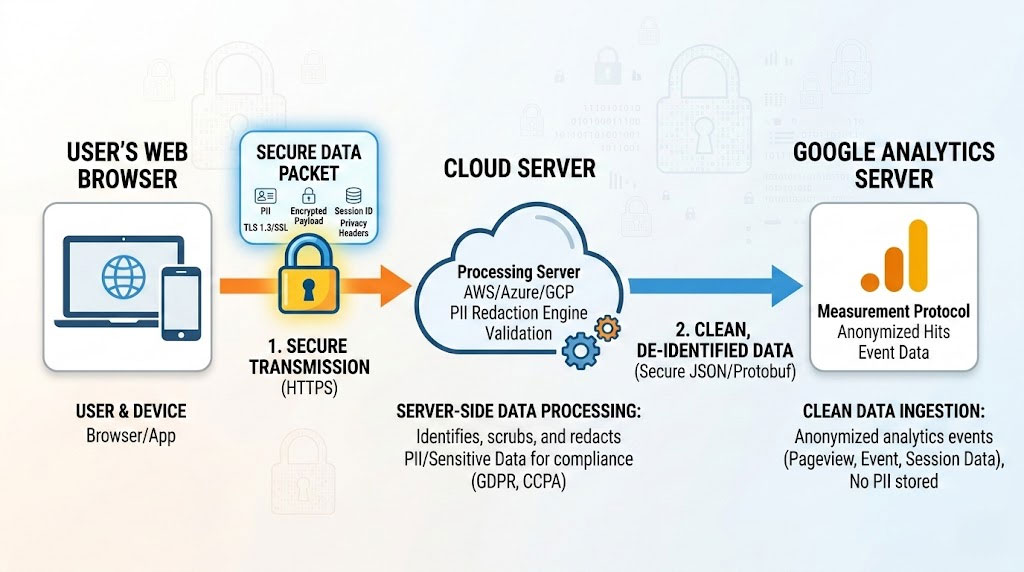
Server-side tagging has become mainstream in 2025, moving from a niche advanced setup to a recommended best practice for high-volume stores. Instead of sending tracking data directly from the user’s browser to Google, server-side tagging routes data through your own server first. This provides several key advantages for Saudi e-commerce analytics.
First, it significantly reduces data loss from ad blockers. With ad blockers affecting up to 25% of web traffic, server-side tagging bypasses browser restrictions by using a custom subdomain (for example, analytics.yoursite.com) that appears as first-party traffic. According to Stape.io (December 2025), merchants using server-side setups have achieved up to 95% tracking reliability on GA4, closing a 30% gap compared to client-side-only implementations.
Second, server-side tagging improves tracking reliability through Saudi payment gateway redirects. When users leave your domain to complete payment on HyperPay or Moyasar, client-side sessions can break. Server-side processing handles this more gracefully by validating events server-to-server before forwarding to GA4.
To implement server-side GTM, you need a server container hosted on Google Cloud Platform (or an alternative like Stape.io), a custom subdomain pointing to your server container, and your existing web GTM container configured to send data to the server endpoint. The Google Tag in your web container needs the server_container_url parameter set to your custom subdomain. While the setup is more complex than client-side tracking, the data quality improvements justify the investment for stores processing significant transaction volumes.
Consent Mode v2 Implementation for Saudi Stores
Saudi Arabia’s Personal Data Protection Law (PDPL) became fully enforceable on September 14, 2024, after a one-year grace period. The PDPL is enforced by the Saudi Data and Artificial Intelligence Authority (SDAIA) and applies to any entity processing personal data of individuals in Saudi Arabia, including international companies. Violations can result in fines of up to SAR 5 million, with the penalty doubled for repeat offenses.
Google Consent Mode v2, mandatory for EEA traffic since March 2024, adjusts data collection based on user consent. It introduced two additional parameters (ad_user_data and ad_personalization) alongside the existing analytics_storage and ad_storage. When users deny consent, GA4 sends anonymized “pings” in advanced mode that enable behavioral modeling to recover up to 70% of lost attribution data while maintaining privacy compliance.
Basic implementation blocks all Google tags until consent is granted, then adjusts based on user choice. Advanced implementation loads Google tags before consent interaction and sends cookieless pings if consent is denied, feeding GA4’s modeling capabilities.
For Saudi stores primarily serving local customers, implementing consent mode demonstrates compliance readiness under the PDPL and builds consumer trust. For stores with significant international traffic or running Google Ads campaigns targeting the EEA, Consent Mode v2 is mandatory to maintain access to remarketing, personalization, and measurement features. Starting July 2025, Google began restricting data collection from sites without proper consent systems, making this implementation time-sensitive.
GA4 BigQuery Export for Saudi Enterprises
For high-volume Saudi e-commerce businesses, GA4’s native BigQuery export unlocks capabilities beyond standard reports. With expanding local cloud infrastructure and Saudi Arabia’s digital economy transformation accelerating data-driven decision-making, enterprise analytics are increasingly accessible.
BigQuery export provides raw event-level data for custom analysis, longer data retention beyond GA4’s 14-month limit, the ability to join GA4 data with CRM, inventory, and backend systems, and advanced attribution modeling beyond GA4’s built-in options. This is especially valuable for enterprise brands operating omnichannel strategies that need a unified view of customer interactions.
To enable BigQuery export, navigate to Admin > BigQuery Links in your GA4 property. You will need a Google Cloud project with billing enabled. Note that debug events are automatically excluded from BigQuery exports, so production validation requires real traffic.
GA4 and Looker Studio Reporting for Saudi E-Commerce

While GA4’s built-in reports provide a solid foundation, Looker Studio (formerly Google Data Studio) enables custom dashboards that combine GA4 data with other sources for comprehensive e-commerce reporting. For Saudi businesses managing multi-channel operations, this is where actionable insights come together.
I recommend building three core dashboards for Saudi e-commerce analytics. The first is an Executive Overview that shows revenue trends, key event rates by channel, and top-performing campaigns in a format leadership can digest quickly. The second is a Payment Method Analysis dashboard that tracks conversion rates and average order values by payment type (Mada, STC Pay, credit card, BNPL), revealing which methods convert best and where friction exists. The third is a Funnel Health Monitor that visualizes drop-off rates between view_item, add_to_cart, begin_checkout, and purchase, with filters for device type, traffic source, and payment method.
When connecting GA4 to Looker Studio, use the native GA4 connector and be aware that key event metrics will differ from the Advertising section due to different attribution models. For the most accurate e-commerce reporting, blend GA4 data with BigQuery exports when possible.
FAQ: GA4 Ecommerce Tracking Saudi Arabia
Is GA4 mandatory for Saudi e-commerce businesses?
GA4 is not legally mandatory, but Universal Analytics stopped processing data in July 2023. GA4 is now the only viable Google Analytics platform for measurement and growth. Saudi businesses without GA4 are essentially operating without analytics visibility for Google-based attribution. With the Saudi e-commerce market projected to reach $31.29 billion in 2026, operating without proper analytics means making decisions in the dark during a period of rapid growth.
How do I track Mada and STC Pay payments in GA4?
Track Mada and STC Pay using the add_payment_info event with payment_type parameter set to “mada” or “stc_pay”. Fire this event when the user selects their payment method, before they are redirected to complete the transaction. Then fire the purchase event only after receiving a successful payment callback on your confirmation page. Never rely on the redirect URL alone, as users may navigate away or experience errors mid-transaction. For stores using server-side GTM, you can also validate payment completion server-to-server for higher accuracy.
What’s the difference between Universal Analytics and GA4 for Saudi stores?
Universal Analytics used a session-based model with pageviews as the foundation. GA4 uses an event-based model where every interaction is an event with parameters. For Saudi e-commerce, key differences include: no “goals” in GA4 (replaced by key events), different attribution models including data-driven attribution as the default, new metrics like engagement rate replacing bounce rate, and enhanced cross-platform tracking for stores with mobile apps. The transition requires rethinking how you structure tracking, not just migrating existing tags.
Should I use GA4 server-side tracking?
For high-volume Saudi stores and complex payment flows, server-side tracking significantly improves accuracy and reliability. Benefits include reduced impact from ad blockers (recovering up to 25% of otherwise lost data), more reliable tracking through payment gateway redirects, better data quality for consent mode implementation, and improved page load performance by moving tracking logic server-side. The trade-off is increased implementation complexity and hosting costs for a server-side GTM container. For stores processing more than 1,000 monthly transactions, the ROI typically justifies the investment.
What are the most common GA4 tracking errors for Saudi e-commerce?
Based on implementations I have audited: (1) Currency inconsistency, mixing SAR and USD across events causes revenue calculation errors. (2) Missing transaction_id, which prevents proper deduplication. (3) Firing purchase on page load instead of after payment confirmation. (4) Not marking purchase as a key event in GA4 admin (though purchase is marked by default since 2024). (5) Broken cross-domain tracking when redirecting to payment gateways. (6) Duplicate events from page refreshes on confirmation pages. (7) Missing items array parameters causing incomplete product reporting.
How long does it take to trust GA4 data?
With correct implementation and validation through DebugView, meaningful insights can be trusted within two to four weeks of clean data collection. The first week should focus on validation and fixing any discovered issues. Weeks two through four build baseline data for comparison. After one month, you should have enough data to identify patterns and make optimization decisions with confidence. For Google Ads key event modeling to work effectively, you need at least 700 ad clicks over seven days per country and domain.
What is the difference between key events and conversions in GA4?
Since March 2024, GA4 uses “key events” to describe important actions you track within the GA4 interface (such as purchases, form submissions, or sign-ups). “Conversions” now specifically refer to key events that have been imported into Google Ads for campaign optimization. The functionality is identical, but the terminology change clarifies the distinction between GA4 analytics reporting and Google Ads bidding. All your existing conversion setups were automatically migrated to key events, and no action was required on your part. In GA4, navigate to Admin > Events and look for the “Mark as key event” toggle to manage your key events.
Final Thought: Your Next Move
GA4 ecommerce tracking Saudi Arabia is not about dashboards. It is about confidence. Confidence in your data, your decisions, and your growth strategy.
With Saudi e-commerce projected to reach $54.87 billion by 2031 and competition intensifying from both local platforms and international players like Amazon.sa and Noon, accurate measurement is a competitive advantage. The stores that understand exactly which campaigns drive profitable customers, which payment methods convert best, and where the funnel leaks will outpace those operating on guesswork. Saudi Arabia’s broader digital transformation journey makes this the right time to invest in analytics infrastructure.
The question is simple. Are you using GA4 as a reporting tool, or as a true growth engine?
Related reading:
- Buy Now Pay Later in Saudi Arabia: Impact on E-Commerce
- Digital Consumer Behavior in Middle East E-commerce: The 2026 Guide
- Caching WordPress Using Cloudflare the Proper Way
- Ecommerce Trends 2026: 10 Technologies Reshaping Online Shopping
Sources: Mordor Intelligence (January 2026), PS Market Research (2025), Google Developers Documentation, Analytics Mania, SDAIA, Stape.io (December 2025). Market data reflects 2025-2026 projections from industry research reports.

Husain Alhaboubi is Director of Digital Channels at Mobily, where he leads platform optimization, AI-powered customer engagement, and UI/UX strategy. With 20+ years of experience spanning eCommerce, IT infrastructure, and digital marketing, he previously drove a 225% revenue increase and 69% organic traffic growth as eCommerce Senior Manager at flyadeal, and managed enterprise IT operations — including data centers, ERP systems, and network security — as Group IT Manager at IPD Group.
Husain holds a BS in Information Systems from the University of Texas at Arlington and is certified in Google Ads, Google Analytics, and Semrush SEO. He writes from hands-on experience across both sides of digital business: the strategic (eCommerce, SEO, AI, digital transformation) and the technical (server administration, cloud computing, web development, networking, and security) — with a particular focus on the Saudi market and Vision 2030. Read his full resume →